

Appearance
Mounting & rigging overview
Mounting turns a screen's wall of panels into concrete rigging hardware. Pick how the screen is physically supported (flown, ground stacked, or wall mounted) and LED.FYI computes every bar, truss, clamp, foot and hook for you: placed in the 3D view, itemized on the Bill of Materials, rolled into the Weight Estimate, and drawn on your elevation sheets and DXF exports. Mounting is purely additive: it never changes your panel layout, wiring or power.
Setting up mounting on a screen
Select a screen in the left rail (under SCREENS), then click the Mounting header in the Inspector on the right to unfold it. The section starts folded; while folded, its header shows the current mode (None, Hanging, Ground stack or Wall mount), so you can see how the selected screen is supported without opening it. The app remembers the fold on this computer: unfold it once and it stays open for the next screen you select.
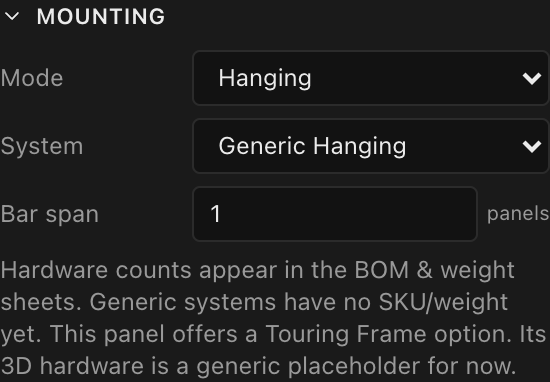
Three controls appear for every mode; ground stacking adds two more (covered on Ground stacking):
| Control | What it does | Default |
|---|---|---|
| Mode | The support concept: None, Hanging, Ground stack or Wall mount | None (no hardware is computed) |
| System | Which kit of hardware fulfils the mode (visible once Mode ≠ None) | The mode's generic system |
| Bar span | How many panel-widths each bar or profile covers, 1–4 panels | 1 |
Choosing a mode automatically selects that mode's generic system and resets Bar span to 1. Setting Mode back to None clears the mounting entirely. Every change is a single undoable edit (see Undo, redo & versions).
The chosen system is snapshotted into your project file, so the document stays self-contained even if the equipment library changes later.
The three modes at a glance
| Mode | What gets built | Details |
|---|---|---|
| Hanging | Bars tiled along the top edge, each with two half-coupler pickup clamps | Hanging (flown) rigs |
| Ground stack | Base bars with leveling feet, vertical truss towers behind the wall, ground trusses on the floor, and bridge clamps | Ground stacking |
| Wall mount | Horizontal profile rails behind every panel row, L-bracket wall feet, and two over-the-rail hooks per panel | Wall mounting |
Bar span
Bar span is shared by all three modes: it sets the preferred width of each hanging bar, stacking base bar or wall profile, in panels (1–4). The engine tiles bars left to right at your preferred span and fills any remainder with smaller bars so every column is covered: a 5-column screen at 2 panels gets a 2-wide + 2-wide + 1-wide bar.
Curved screens always use 1-wide bars
On a curved screen the engine forces 1-wide bars regardless of the Bar span setting, because a rigid wider bar can't stay flush across columns that fan around an arc. There is no warning in the app; you simply get 1-wide bars. What counts is the actual angle: a screen whose curve is set to 0° is a flat wall and keeps the bar span you chose.
Touring frames in one sentence
A Touring Frame is not a fourth mode; it's an alternate System for Hanging and Ground stack that only appears when the screen's panel type supports it (today: the ROE Visual Graphite 2.6 family). See Mounting systems, touring frames & compatibility.
Where the hardware shows up
- 3D view: the Mounting overlay button renders every piece as shaped metal in the scene.
- Bill of Materials: an automatic Mounting hardware section, merged across screens.
- Weight Estimate: mounting rows appended after the panel rows.
- Elevation drawings: dashed reference outlines on the front view; real depth profiles on the side, top and isometric views.
- PDF & DXF export: everything the sheets draw exports, with mounting on its own CAD layer.
All of these read the same single computation, so they can never disagree with each other. Part lengths on the paperwork print in the drawing set's pinned distance units, so an imperial set lists 1w hanging bar (19-11/16") (fractional inches to the nearest 1/16") rather than millimetres. Full tour: Mounting in 3D and on your paperwork.
Generic kits vs. branded kits
The five built-in systems (Generic Hanging, Generic Ground Stack, Generic Wall Mount, plus the two Touring Frame variants) are fully parametric: bars are sized to your panel's pitch and depth, and the hardware renders as procedurally-built shapes. They carry no SKUs, no weights and no load ratings, which is why the BOM's Detail column is blank and the Weight Estimate shows - for mounting rows today. The Inspector's hint says exactly this: "Hardware counts appear in the BOM & weight sheets. Generic systems have no SKU/weight yet."
Branded manufacturer kits (with real part numbers, weights, spacing rules, load ratings and 3D models) are the designed-for future of the same picker. What they will add is described under branded kits.