

Appearance
Panel types & picking a panel
The panel type is the single decision that drives most of a screen's numbers: resolution, physical size and depth, pitch, wattage, weight, curve limits, and which half-size and shaped sibling products exist. Pick a real product from the equipment library, or make the screen custom and type the spec yourself.
Picking a type
Select the screen, then open Inspector → PANEL → Type:
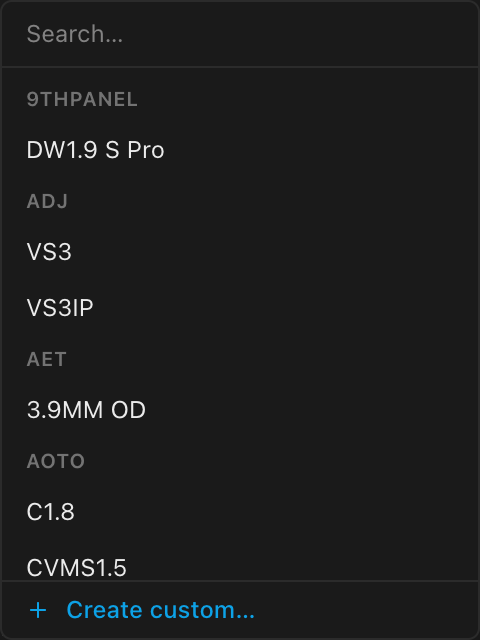
The picker is a searchable dropdown grouped by brand; the search matches brand and model names. At the bottom, + Create custom… opens the full custom-panel authoring form (see below). Guidance on comparing products lives in Choosing equipment. Unlike the Add switch picker, the panel-type picker lists the whole library; panels aren't compatibility-filtered against anything.
Picking a type stamps the product's spec onto the screen:
- Pixel size and physical size (including depth: real cabinet thickness in 3D and on side/top elevation drawings)
- Wattage feeds the power strings, weight feeds the weight sheets and BOM, pitch appears everywhere the wall is described
- Curve limits constrain screen curving
- Half-size and shaped siblings in the same product family power half panels and panel shapes. A sibling is a separate product with its own spec, so it is ordered and weighed under its own name on the bill of materials; a half row never counts as full cabinets.
The chosen record is snapshotted into your project file, so the project opens identically later even if the library entry changes or disappears.
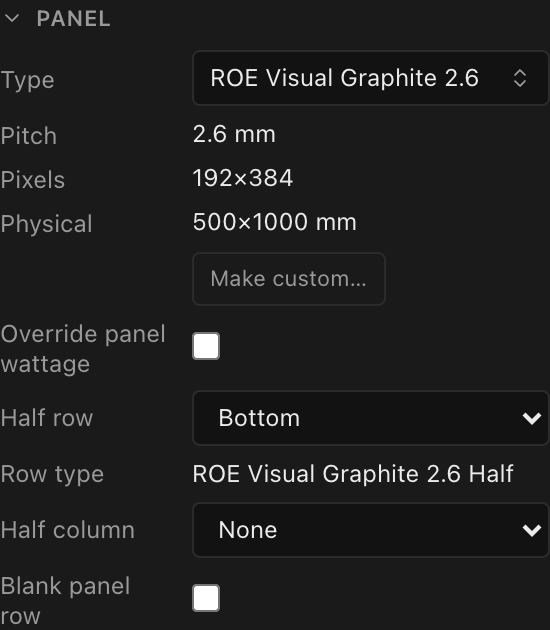
With a library type selected, the PANEL section shows the type's read-only Pitch, Pixels, and Physical values, plus a Make custom… button:
On a screen cut into slices the Type picker is disabled: a new panel size would move the seams the slices are pinned to. Ungroup the slices to change the type.
Changing type resets some per-panel work
Switching the screen's panel type regenerates the grid at the same dimensions and, in the same undo step, (a) flattens any per-panel shaped-corner overrides from the old family, and (b) if the current mounting system is no longer compatible with the new tile (e.g. a branded touring frame the new product doesn't offer), falls back to the mode's generic mounting system. See Panel shapes and Mounting systems.
Custom panels: Make custom…
Click Make custom… to detach the screen from the library and edit the spec in place (the button's tooltip: Detach from the library and edit size / resolution / wattage / weight freely). The type reads Custom panel and these fields become editable:
| Field | What it sets | Values | Seeded from |
|---|---|---|---|
| Pixels W/H | Per-panel resolution | integers ≥ 1 px | the previous type (else 128×128) |
| Physical W/H | Cabinet size | mm ≥ 1, decimals allowed | the previous type (else 500×500) |
| Wattage | Max power draw per panel | W ≥ 0 | the previous type (else 400 W) |
| Weight | Per-panel weight | kg ≥ 0 | the previous type (else 8 kg) |
| Pitch | Read-only, derived: physical width ÷ pixel width | n/a | n/a |
Under the hood a custom spec is a real panel-type record embedded in the document (wattage still feeds power strings, weight still feeds the weight sheet), so nothing downstream treats custom panels differently from library picks.
Editing an existing custom spec in place keeps any per-panel shaped corners; switching to custom from a different type flattens them (same rule as any type change).
This is the screen-level way to model a nonstandard tile or resolution. For a single odd panel inside an otherwise normal wall, use per-panel overrides instead.
Creating a brand-new custom product
+ Create custom… at the bottom of the picker opens the full authoring form: a complete datasheet (pixels, mm size including depth, wattage, weight, bandwidth, shape, brightness, refresh, IP rating, voltage range, and more). Offline or signed out, the record is embedded in this document only; signed in, it's also saved as a reusable row in your library. Custom panels are open to every account; processors, cards, switches and receiver cards are admin-only (everyone else requests them). The form is documented in Creating custom equipment.
Panel specifications (datasheet read-outs)
When the chosen product publishes datasheet fields, a read-only PANEL SPECIFICATIONS section appears on the screen inspector: brightness (nits), refresh rate, contrast, color depth, max frame rate, HDR, environment, IP rating, lifetime, mounting pattern, input voltage, max current, redundant PSU. Only rows the product actually publishes appear; with none, the whole section is hidden.
The same rows print on the Panel Specifications sheet block. There, the mounting pattern (the only row carrying a physical length) follows the drawing set's pinned distance units: 250 × 250 mm · M6 on a metric set, 9-13/16" × 9-13/16" · M6 on an imperial one, fractional inches to the nearest 1/16", since this pattern is drilled to a rule. The screw size is a thread designation, not a length, so it never converts.
These rows share the exact data model with the printed Panel specs sheet block, so the inspector and your paperwork can never disagree.