

Appearance
Ground stacking
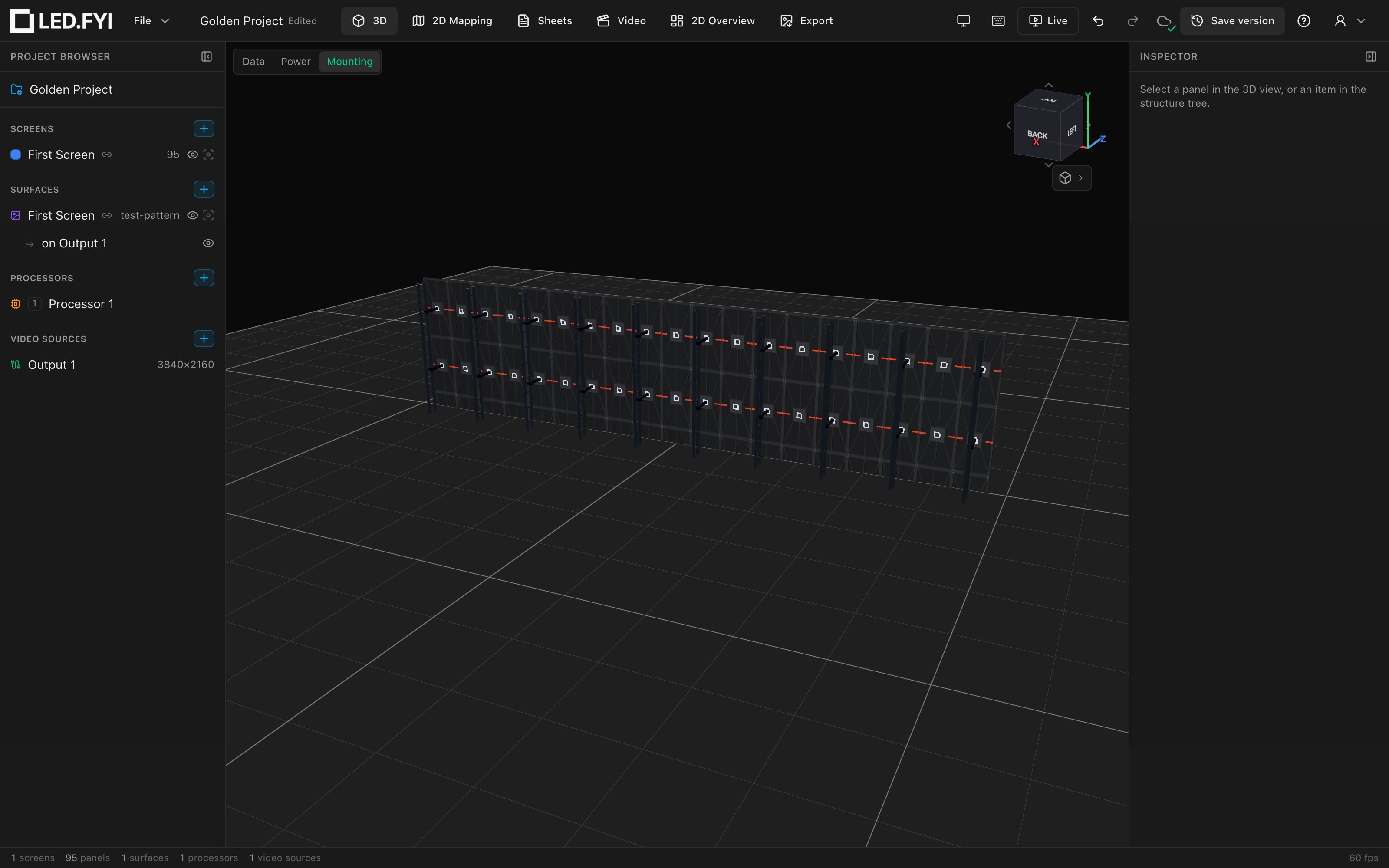
Set Inspector → Mounting → Mode to Ground stack and LED.FYI builds a floor-supported rig behind the wall: base bars with leveling feet, vertical truss towers, ground trusses running back along the floor, and bridge clamps tying the wall to the towers.
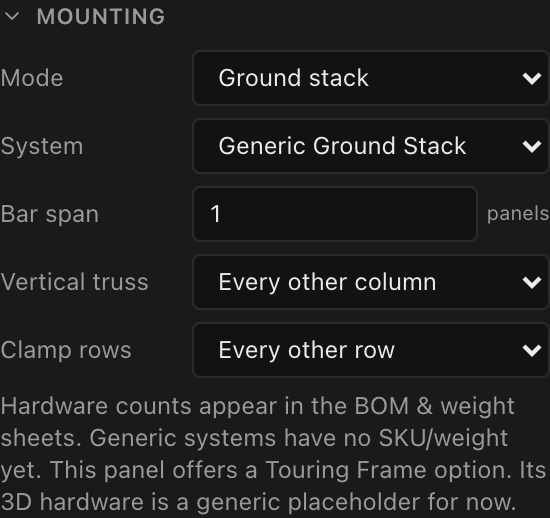
The two extra controls
Ground stacking adds two dropdowns to the Mounting section:
| Control | Options | Default | What it does |
|---|---|---|---|
| Vertical truss | Every column / Every other column | Every other column | How many columns get a truss tower behind them |
| Clamp rows | Every row / Every other row | Every other row | Which panel rows get a bridge clamp to the truss |
With Every other column, towers go behind columns 1, 3, 5… and the last column is always added so the end of the wall is never unsupported (on an even-width screen that means the last two columns are both supported). With Every other row, clamps go on alternating rows starting from the second row up, and the top row is always included: a 1-row screen clamps its only row, a 2-row screen clamps just the top row.
The four hardware families
1. Stacking base bars. Tiled along the bottom edge exactly like hanging bars tile the top: greedy fill at your Bar span, cross-section equal to the panel depth, curved screens forced to 1-wide. Each bar carries two threaded leveling feet near its ends (80 mm tall, drawn as a threaded shaft on a base disc). Feet are not separate BOM lines; they ship with the bars.
2. Vertical truss towers. A 200 mm-square laddered truss rises behind each selected column, set 250 mm behind the panel backs. Towers are built from stacked segments chosen greedily to match your wall height: 2-panel-high segments first (skipped when that would exceed 1200 mm), then 1-panel-high segments, then a half-panel tail if the height calls for it. A wall of 1000 mm-tall panels, 4.5 panels high, stacks four 1000 mm segments plus one 500 mm segment.
3. Ground trusses. One per truss column: a 1000 mm horizontal truss lying on the floor, running straight back from the wall (the rig's floor footprint), with a rear leveling foot at its far end. The 1000 mm length is fixed in this release (there's no control for it yet).
4. Bridge clamps. At each selected row, each truss column gets a bridge from the panel back to the tower: a horizontal standoff tube reaching from the panel to the truss's front chord, ending in a half-coupler jaw that grips the chord. Clamp count = truss columns × clamp rows, so a 10-tower wall clamped on 3 rows uses 30 clamps.
Blank (spacer) bottom rows raise the stack
A blank panel row (structural spacer panels with no electronics, toggled in the Inspector's Panel section) is real structure, and the mounting engine treats the screen as one row taller: the base bars drop under the blank row, the truss towers grow, and clamp counts increase. With Half-height blanks ticked, the blank row is half a panel tall, so the stack rises by half a panel instead of a full one. Spacers also join the BOM and the Weight Estimate.
Holes don't count, spacers do
Plain disabled panels (holes punched in the grid) are excluded from mounting, BOM and weight. Blank spacer panels are included everywhere structural. If the bottom of your stack needs support under a gap, use blank panels, not disabled ones.
Half panels and curved walls
Row geometry sums real per-panel heights, so a half-height row shifts the base height, tower segments and clamp positions correctly. On curved screens every piece (base bar, leveling feet, truss tower, ground truss, rear foot and bridge clamp) inherits its column's rotation and sits on that column's normal, and base bars are forced 1-wide (silently, like all curved-screen mounting adjustments; a curve set to 0° counts as flat and keeps your bar span). Disabled panels don't change the shape of the rig: the towers still fan around the arc, and the only piece a hole removes is the bridge clamp that would have gripped that panel. Half-panel columns are not specially handled: base-bar lengths, in 3D and on the BOM, assume every column is a full panel wide, so check the base bars by hand where a wall has a half column.
A corner panel column gets a folded stacking bar bent 90° under the corner, with a leveling foot near each outer end. Base bars never run across a corner (each straight stretch is tiled at your Bar span on its own), and a corner doesn't count as a curve, so a cornered wall keeps its wide base bars.
What lands on the BOM
| Item | What drives the quantity |
|---|---|
1w stacking bar (500 mm) etc. | One line per bar size, from the Bar span tiling |
90° corner stacking bar (500 mm) | One per corner column (no SKU yet) |
Ground truss (1000 mm) | One per truss column |
Vertical truss segment (1000 mm) etc. | One line per distinct segment length |
Truss clamp | Truss columns × clamp rows |
Each length in a description follows the drawing set's pinned distance units: an imperial set lists Ground truss (39-3/8"), in fractional inches to the nearest 1/16". The 1w bar span is a count of panel widths, not a length, so it never converts.
Leveling feet and rear feet are deliberately not listed; they ship with their bars and trusses. Quantities merge across screens that share a description; the Detail (SKU) column stays blank for generic kits. See Mounting in 3D and on your paperwork.