
Appearance
Modular processors: cards & chassis slots
Some processors aren't fixed boxes but chassis you populate with cards: input cards for video in, output cards for data to the wall. LED.FYI models these faithfully: a modular processor starts empty (zero inputs, zero outputs) and gains capability slot by slot as you fit cards, exactly like racking the real unit.
Fixed vs. modular
A processor model either has fixed built-in I/O (most of the built-in library: the Bromptons and most Novastars) or declares chassis slots. Once you pick a model, a small badge under the Processor picker says which: Fixed I/O or Modular chassis.
The built-in library ships three modular chassis:
| Chassis | Input slots | Output slots |
|---|---|---|
| Megapixel Helios | Slot 1 and Slot 2 (the two VFMC slots) · Slot 3 (SFP+ input bank) | Slot 4 (output bank) |
| Novastar MX2000 Pro | Slot 1 – Slot 2 | Slot 3 – Slot 4 |
| Novastar MX6000 Pro | Slot 1 – Slot 8 | Slot 9 – Slot 16 |
Need a chassis that isn't listed? Request it and the LED.FYI team adds it to the built-in library.
Fixed processors never show the card sections and are never gated; their ports are always there. Everything on this page applies only to a processor whose model declares slots.
Fitting cards
Assign a modular model and two extra Inspector sections appear (Input cards and Output cards → wall), one picker row per physical slot, numbered in the chassis's own order. Fold a section and its header shows how many of its slots are filled (1/2).
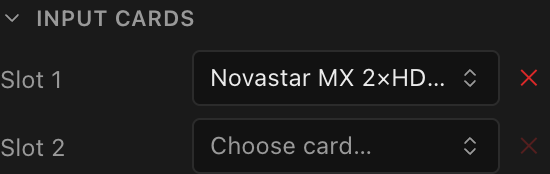
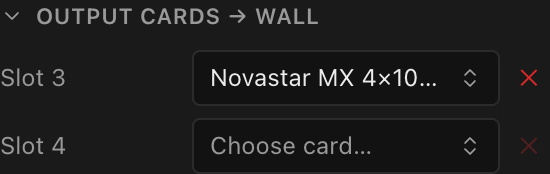
- Each slot's picker only offers library cards that fit that slot: the card's role must match (input vs. output), and it must be made for that slot. On the Helios the VFMC slots take VFMC cards, Slot 3 takes the SFP+ input-bank cards and Slot 4 the output-bank cards; on the MX chassis every MX card of the right role fits every slot of that role. Incompatible cards simply aren't listed.
- The ✕ button clears the slot (disabled while the slot is empty).
The built-in library ships these cards:
| Chassis family | Input cards | Output cards |
|---|---|---|
| Megapixel Helios | HELIOS VFMC HDMI 2.0 · HELIOS VFMC HDMI 2.1 · HELIOS VFMC DP 1.4 · HELIOS VFMC ST 2110 100G (QSFP) · HELIOS 4× 12G-SDI (SFP+ bank) · HELIOS 4× ST 2110 10G (SFP+ bank) | HELIOS 8× 10G Fibre (SFP+ bank) · HELIOS 8× 1G Copper (SFP bank) |
| Novastar MX | MX 2×HDMI 2.1 · MX 4×HDMI 2.0 · MX 1×DP 1.4 (8K@60Hz) · MX 2×DP 1.4 · MX 4×DP 1.2 · MX 1×DP 1.4+HDMI 2.1 · MX 4×12G-SDI · MX 1×ST 2110 (25G) · MX 2×ST 2110 (25G) · MX 1×ST 2110 (100G); each an Input Card | MX 4×10G SFP+ · MX 1×40G QSFP+ · MX 8×5G Base-T; each an Output Card |
Input and output cards are first-class library items with their own ports, per-card capacity tables, slot tags and input limits. They're added by the LED.FYI team; if the card you use is missing, request it. (Platform admins author them in the Equipment library dialog; see Creating custom equipment.)
Cards that fill more than one slot
Some cards are physically bigger than one slot. The Megapixel HELIOS VFMC ST 2110 100G (QSFP) input card, for example, fills both of the HELIOS's VFMC slots. In the real rack there is simply no room left beside it.
LED.FYI models that as real estate, not as a label:
- Fit such a card and the slot it covers changes from a picker to a greyed N/A; hover it to see which card is using it ("Used by the HELIOS VFMC ST 2110 100G (QSFP) in slot 1 (it spans both slots)"). There is nothing to choose there, and nothing to clear: the space is taken.
- A slot's picker also hides any card too big to fit: one that would overrun the end of that bank, or reach into a slot another card already occupies. A card that can't physically go there is never offered.
- The capacity figures only ever count each physical card once. A card cannot be counted twice by occupying the same space as another, so a processor can never advertise more inputs or outputs than the chassis can actually hold.
A spanning card only blocks the slots it actually fills, never a different bank. On the HELIOS, the 100G card covers the two VFMC slots, and that is all it covers. The separate SFP+ input bank is untouched, so this is a perfectly normal HELIOS you can rack:
| Slot | Card | Inputs |
|---|---|---|
| Slot 1 + Slot 2 (one card, spanned) | HELIOS VFMC ST 2110 100G (QSFP) | 1 |
| Slot 3 (SFP+ input bank) | HELIOS 4× 12G-SDI (SFP+ bank) | 4 |
| Total | 5 |
Five inputs, and LED.FYI reports five. The count only ever comes down when two cards are recorded in the same physical slot, something you cannot do in the app, but which an older or externally-edited project file can contain. An over-stated port count is the kind of mistake that produces a design which looks fine on screen and cannot be built on site, so opening such a project quietly corrects its capacity back down to what the hardware provides. The project still opens, and your cards are still listed.
What fitting a card changes
Cards update the processor's effective spec live:
- Output cards expose output ports: the processor's Switches and String assignment sections appear, ready for string assignment and switches and trunks.
- Input cards expose physical input ports as rows in the Video input ports section, where you bind video sources per port and choose an input mode.
- The Signal section's capacity figures follow the fitted output cards: when a fitted card publishes its own capacity table, that table wins; otherwise the chassis-level table applies.
- The Bit depth and Frame rate menus follow the same table. If the processor's current combination isn't in the fitted card's table, it moves to the lowest combination the card offers: a Helios at 10-bit /
23.976 Hzmoves to 10-bit /24 Hzwhen you fit the 8× 10G Fibre card, which publishes no fractional rates. Check the Signal section after fitting an output card.
Gating: an empty chassis can't do anything
Until the right card is fitted, the dependent sections show a gate message instead of controls:
- Ports & strings: "No output card installed. Add an output card under "Output cards → wall" above to expose ports for string assignment, switches, and trunks."
- Video sources: "No input card installed. Add an input card under "Input cards" above before assigning a video source."
Each role gates independently: fitting only an output card unlocks wiring while inputs stay gated, and vice versa.
Clearing and swapping cards
What resets, and why
- Clearing or swapping an input card renumbers the physical ports, so all per-port video-source assignments on that processor are cleared, and the active input goes back to the first port, by design, since "port 3" may now be a different physical connector. The same happens when you fit a card into an empty slot before an input slot that already holds a card, because that card's ports shift along. Fitting a card into an empty slot with no filled input slot after it keeps everything already bound.
- Removing an output card clears any wiring that referenced ports which no longer exist.
- Clearing the last fitted card reverts the processor to the empty chassis (0 in / 0 out) and re-gates the Ports & strings and Video sources sections.
- Swapping the processor model clears all fitted cards (they belonged to the old chassis's slots), along with its switches and string assignments (see Choosing a processor).
TIP
Fit your output cards before wiring and your input cards before binding sources, and treat card changes like re-racking real hardware: expect to re-patch what hung off the old card.