
Appearance
DXF export for CAD
The Drawings DXF tab of the Export workbench exports your drawing sheets as DXF, the CAD interchange format AutoCAD, Vectorworks, BricsCAD and friends open natively. A drafter gets editable geometry at true millimetre coordinates, on sensible layers, ready to re-letter and re-plot in their own standards: the exact same flattened scenes the on-screen preview and the PDF export use, emitted as native CAD entities at 1:1 scale (drawing units are millimetres).
A drafter usually wants the parts list next to the geometry: the bill of materials downloads as a spreadsheet from the last row of the same Documents rail, in the same units this drawing set is issued in.
Studio, said up front
The tab and its row in the rail both carry a Studio badge from the moment you open the workbench. Previously the plan check only fired after you had ticked nine boxes and pressed the button.
Picking sheets & filenames
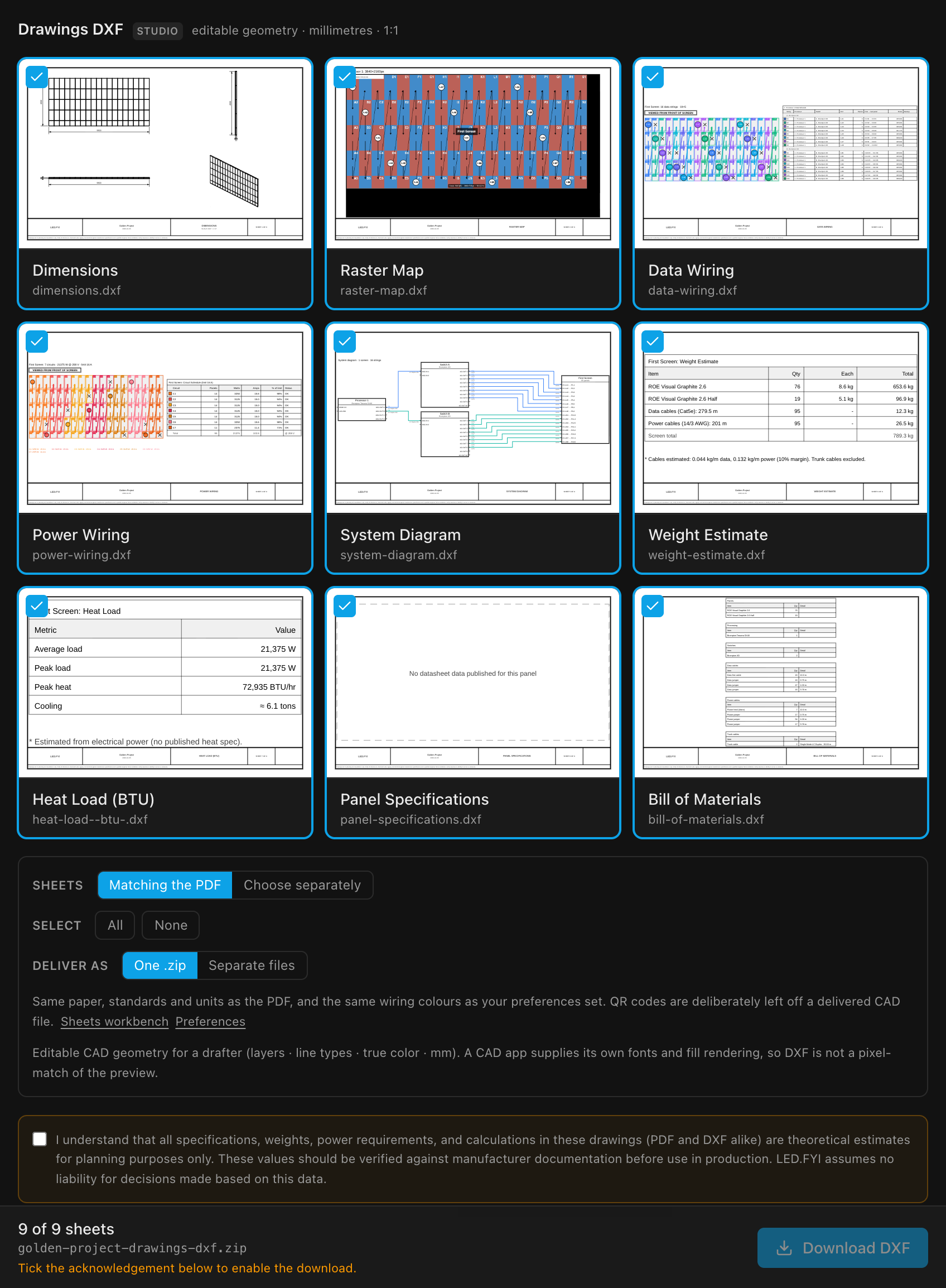
The picker is the same page thumbnails the PDF tab uses (ticking a picture is how you include it), captioned with the .dxf filename each sheet will produce rather than its page number.
| Control | What it does | Default |
|---|---|---|
| Sheets: Matching the PDF | Follow the PDF tab's selection, so you tick your packet once instead of twice | On |
| Sheets: Choose separately | Keep a DXF-only selection (ticking a page here switches to this automatically) | n/a |
| Select: All / None | Tick or clear every sheet | All on |
| Deliver as: One .zip / Separate files | One archive, or the .dxf files saved one after another | One .zip |
| Liability acknowledgement | Required: the same single acknowledgement the PDF tab shows (tick it in either place) | Off until you tick |
| Delivery | Filename |
|---|---|
| A single picked sheet | <project>-<sheet>.dxf |
| Several sheets, One .zip | <project>-drawings-dxf.zip |
| Several sheets, separate files | One <project>-<sheet>.dxf save per sheet |
Earlier builds decided the archive question silently by counting your sheets, so a drafter who wanted six separate files couldn't have them.
The "Drawings exported" notice appears only once the file is written. Cancel a save dialog and nothing is announced; if a file can't be written (on the desktop app, typically a .dxf still open in your CAD program), the app says why and offers Save as…; separate-file delivery stops at that file, with the ones before it already saved. See Where the file goes.
As with every drawing export, what each sheet contains is configured in the Sheets workbench; the picker only chooses which sheets ship. Paper, standards and units are the drawing set's, exactly as for the PDF.
What the DXF preserves
| Aspect | How it's written |
|---|---|
| Geometry | Every primitive as a native entity at correct mm coordinates: rectangles/polylines → LWPOLYLINE, lines → LINE, circles → CIRCLE, arcs → ARC, text → TEXT, fills → solid HATCH |
| Dimensions | Real DIMENSION entities (not faked lines) that the CAD app re-renders with its own dimension style |
| Layers | Each scene layer becomes a DXF layer, so a drafter can toggle and edit by layer |
| Line types | Dashed / dotted / center / phantom survive as DXF LTYPE definitions |
| Color | Stroke and fill colours are written as DXF true color, so colours match, including the wiring-sheet palettes and the main/backup pair from your Preferences, and any processor colour saved in the project. The DXF honours all of them exactly as the PDF does |
Sheet text, including translated drawing labels, is carried as plain text strings for the CAD app to render, so every app language (including Chinese) travels fine. Notes and leaders arrive already broken into the same lines as the preview and PDF, at their set text height and alignment; only their Bold setting is lost (see below).
Expected divergences: a DXF is not a screenshot
A DXF is data for another application, not a picture. The opening CAD app supplies its own fonts, lineweight display and fill shading, so a DXF cannot pixel-match the preview; that's inherent to the format, not a defect. The in-app note under the picker says exactly this.
| Aspect | Preview / PDF | DXF opened in a CAD app |
|---|---|---|
| Font | Liberation Sans, embedded | The app substitutes its own text style; letter shapes and spacing differ |
| Fills | Flat colour fill | Solid hatch; some apps shade hatches differently |
| Lineweights | Drawn in mm | Shown per the app's lineweight/plot-style settings |
| Bold text | Bold face (bold block titles, notes) | Regular weight; a DXF TEXT entity carries no font weight |
| Images / logos | The actual image | A bounding box plus an [image] text note |
| Raster Map picture | The canvas's picture under the outlines | Not written at all; the Raster Map arrives as its outlines and labels only, even though the tab's thumbnail shows the picture |
| QR code | Placeholder square / real code (PDF) | Not emitted at all; no dead placeholder on a delivered CAD file |
TIP
Hand the drafter the DXF and the PDF: the DXF for editable geometry, the PDF as the visual reference of how the sheet is meant to read.
The liability acknowledgement
A DXF carries exactly the same theoretical specifications, weights, power requirements and calculations the PDF does, so it carries the same acknowledgement, literally the same one:
I understand that all specifications, weights, power requirements, and calculations in these drawings (PDF and DXF alike) are theoretical estimates for planning purposes only. These values should be verified against manufacturer documentation before use in production. LED.FYI assumes no liability for decisions made based on this data.
Download DXF stays disabled until it's ticked, and the export bar says why, as does Download package, which names the DXF as excluded until the acknowledgement is given. The tick is remembered per project on this machine.
One tick covers both drawings formats. The same acknowledgement is shown on this tab and on the PDF tab, so ticking it in either place releases both downloads (and puts both into the package); clearing it in either place holds both back again. It's the same drawing set either way, so agreeing to it twice would be busywork, but it still appears here, in full, rather than becoming something you agreed to on a tab you never opened.
Plan availability
INFO
DXF export requires the Studio plan in cloud-connected builds, and the tab says so before you pick anything. Offline/unconfigured builds are fully entitled. See Plans, billing & what each unlocks.