

Appearance
Cable label export (CSV)
The Cable labels tab of the Export workbench generates a spreadsheet with one row per physical cable in the project: data runs, power runs, trunks and backups. Each row carries the cable's chain label plus both endpoint descriptions, so you print one label per cable end: two labels per cable, feed the file to a label-printer template, and every cable on the truck is tagged before load-in.
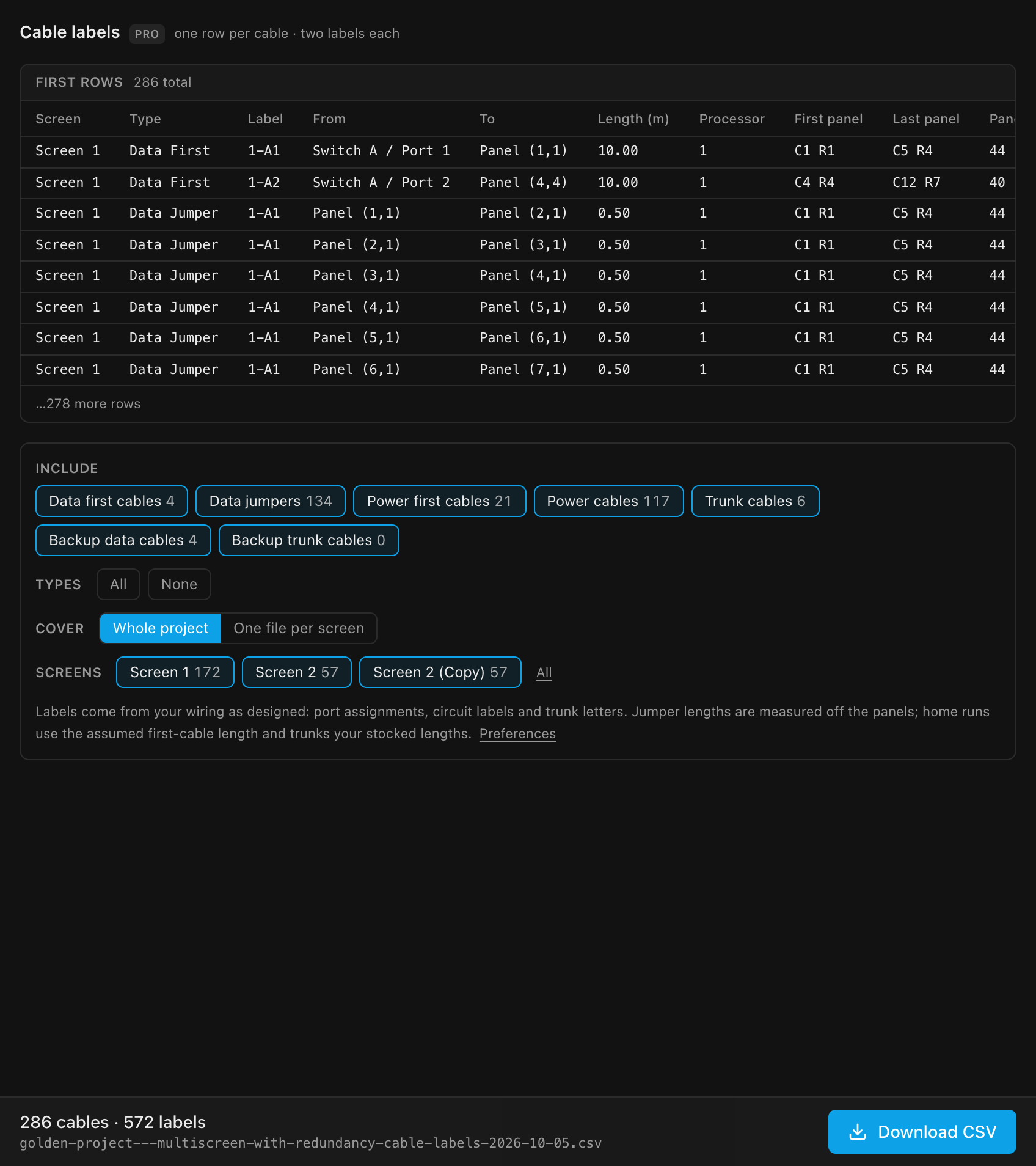
Read the labels before you print 572 of them
The tab opens on the first rows of the actual file (the same ten columns, the same values), and the table follows every toggle you flip. Under it, the export bar counts the whole thing: "286 cables · 572 labels". Download CSV gets you the labels alone; Download package across the top puts the same file (or the same per-screen set) under cable-labels/ in one archive with the rest of your export.
This tab is about the cables you will physically tag. For how many of each to buy, see the bill of materials; it downloads as a spreadsheet too, and its cable counts come from this same per-cable enumeration, so the two can never disagree.
The seven cable types
Each type is a chip carrying its own count, so "Backup data cables 22" is checkable against what you expected instead of disappearing into one grand total. Click a chip to include or exclude that type; All / None set every chip at once. The download is disabled when nothing matches.
| Type | Covers | Default |
|---|---|---|
| Data first cables | Switch/processor output port → the first panel of each data string | On |
| Data jumpers | Panel → panel data cables along a string (with physical length) | On |
| Power first cables | Distro → the first panel of each power circuit | On |
| Power cables | Panel → panel power cables along a circuit (with length) | On |
| Trunk cables | Processor output port → switch | On |
| Backup data cables | Backup port → the last panel of a backed-up string (loop redundancy) | On |
| Backup trunk cables | A spare processor output → a switch's backup uplink: both same-processor trunk redundancy and a mirror processor feeding shared switches | On |
CSV columns
The header row is fixed:
| Column | Contents |
|---|---|
Screen | The screen this cable belongs to, or both screens (Main Wall → Side Wall) when it crosses between two |
Type | Data First · Data Jumper · Power First · Power · Trunk · Backup Data · Backup Trunk |
Label | The chain label (see below) |
From / To | The two endpoint descriptions, one label per cable end |
Length (m) | Metres to 2 decimals: measured for jumpers, assumed for home runs and trunks (see Cable lengths); blank where there's nothing to go on |
Processor | The tag of the processor the From end belongs to (see below); blank on a power row, which runs from a Distro, not a processor |
First panel | The DATA string's first panel, as a wall coordinate (C3 R1; stacked corner panels add a letter, C4 R1a); blank on a power/trunk row |
Last panel | The DATA string's last panel, as a wall coordinate; blank on a power/trunk row |
Panels | The DATA string's panel count; blank on a power/trunk row |
Rows are grouped per screen in document order, then by cable type in the order of the table above. A cable that runs from one screen into the next is exported once, under the screen it starts on, including the jumper that actually crosses the gap, which is a real cable someone has to pull.
Processor is appended after Length (m), and First panel / Last panel / Panels after that, rather than inserted among the other columns, so a label-printer template built against the existing column positions keeps working unchanged even though they're new. First panel / Last panel / Panels describe the whole string a row belongs to, not that row's own two endpoints: a data jumper's From/To are its own two panels, but its First panel/Last panel still name the run's overall extent, matching the Data Schedule's "First → last panel" column. That way a puller holding any single label from a run (a first cable, a jumper, or its backup feed) can find where the run starts and ends without the schedule sheet in hand.
One file, or one per screen
On a multi-wall job each crew usually wants only their own wall, so Cover offers two shapes:
| Cover | What you get |
|---|---|
| Whole project | One .csv with every included cable (the original behaviour) |
| One file per screen | One .csv per screen, bundled into a .zip; a single screen just saves the one file |
A Screens chip row (each screen with its own cable count) narrows the export further; All puts every screen back. It applies to both covers, so you can hand one crew a single-wall file without changing anything else.
How labels are formed
- Data cables use the port label from the string-to-port assignment (
9-A1,9-B3, and so on): the processor's tag, then the port. A string with no port assignment has no first cable to label, so it exports only its jumpers, labeled with the string's project-wideS-number, the same label the 2D overlay, the Inspector and the sheets show for that cable (see Port, string & cable labels). On a screen split across two processors each string gets its ownS-number, so two different strings never share one. - Backup data cables use the backup port's label:
9-C3for a backup on the same processor,9B-A3for one on a designated backup processor, or9B-3for one on the backup processor's own 1G output (its From reads<backup processor name> / Backup Port), except where the two processors share switches, which keeps the primary's tag (see the processor tag). TheirProcessorcolumn names the processor that owns the backup port. - Power cables use the circuit label from the project's power-distribution configuration (see Power: strings, circuits & buffers). On a combined circuit (two or three strings sharing one circuit through a two-fer), each feed carries its own leg letter instead of the bare circuit label:
P3a,P3b,P3crather than three cables all readingP3. That's the whole point at the distro: the labels tell the electrician which leg of the splitter each run belongs to. Uncombined circuits keep their plain label, so a project that never combines exports exactly the labels it always did. - Trunks use the tag plus the trunk letter, e.g.
9-A, matching the switch naming (Switch A). A bonded second trunk is labeled by the output it leaves from (9-B) while its To still names the switch it joins. A backup trunk from a mirror processor that shares the primary's switches takes the mirror's tag (9B-A). See Switches & trunk cables. - Every label carries its processor's tag: the processor's position among primaries (
1,2,3…), or a designated backup processor's own tag (its primary's number plusB, e.g.9B). It's always there, even on a single-processor project (1-A1), not only once a project has more than one processor. See the processor tag. (V1 only prefixed once multi-processor, and wrote2:; V2 always writes2-.) - Panels are identified by their 1-indexed grid position:
Panel (col,row). - Endpoints read like
Processor 1 / Port 3(a direct output, named by the processor's own name),Processor 1 / Port A(a trunk leaving the processor),Switch A / Port 2,Switch A / Backup Port,Switch B / Backup In,Switch A / Backup In (for B)(the backup for a second trunk, on processors such as the CVT4K-S that take one per main trunk),Distro, orPanel (3,1).
Cable lengths
Only jumpers are measured. Every other row carries an assumed length, because processors, switches and distros aren't placed in space, so there's no distance to measure:
| Rows | Length (m) |
|---|---|
| Data jumpers, Power cables | Measured: the straight-line distance between the two panels' physical centres in 3D, so manual panel placement is respected, not just the grid |
| Data first cables, Power first cables, Backup data cables | The project's First cable length from the BOM settings, 10.00 by default. Blank if First cable is set to 0 |
| Trunk cables, Backup trunk cables | The trunk assumption: 30.00 m plus any service loop, or the shortest of your stocked trunk lengths that reaches it (see Cable stock & lengths) |
Treat the assumed lengths as a starting point a puller can correct, not a measurement. The column is always metres, whatever units your drawing set prints in.
TIP
The CSV prints jumpers at their measured length. To print them as the stocked lengths you'll actually pull, set up cable stock and read the bill of materials, which fits every jumper to your stock.
Trunks: pick lists vs purchasing
A trunk shared by several screens is listed under every screen it serves. That's correct for a per-screen pick list (each screen's crew sees every cable that touches their wall), but it over-counts for purchasing. For physical trunk quantities, use the bill of materials, which counts trunks once per switch.
Filenames
| Cover | Filename |
|---|---|
| Whole project | <project>-cable-labels-YYYY-MM-DD.csv |
| One file per screen (bundled) | <project>-cable-labels-YYYY-MM-DD.zip, holding <project>-<screen>-cable-labels-YYYY-MM-DD.csv per screen |
| One file per screen, one screen | <project>-<screen>-cable-labels-YYYY-MM-DD.csv |
The success notice reports how many cables were written, and how many files, and appears only once the file is actually on disk. If it can't be written (on the desktop app, typically a spreadsheet still open in Excel), the app says why and offers Save as…; see Where the file goes.
Plan availability
INFO
Cable label CSV export is included from the Pro plan up. See Plans, billing & what each unlocks.