

Appearance
Per-screen power & string limits
Every electrical knob a screen owns lives in Inspector → POWER: the working voltage and amp budget that size the power strings, an optional String limits fold (caps and a safety buffer for headroom), and circuit numbering. The screen's data-string limits are a separate DATA LIMITS section under Receiver card, and the screen-wide panel wattage override sits with the panel type in PANEL; neither is power. Below all of it, WIRING (COMPUTED) and HEAT LOAD show what the engine derives from those settings, live.
How strings and circuits are actually built from these numbers is covered in Power: strings, circuits & buffers and Data path & string splitting. This page documents the per-screen controls.
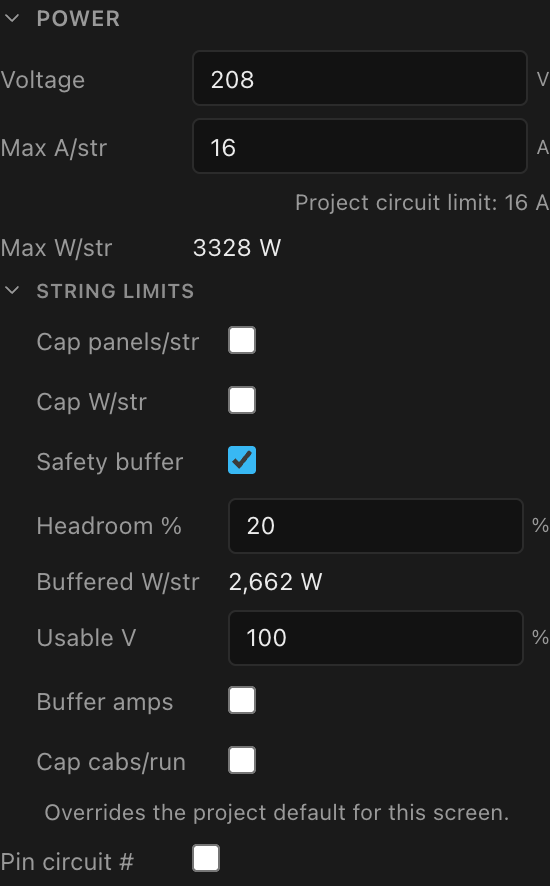
Voltage, amps & the W = V·A budget
| Field | What it is | Default (new screen) |
|---|---|---|
| Voltage | Working voltage for this screen's power strings (V) | 220 |
| Max A/str | The amp budget per power string (A), never above the project's Circuit amps | the project's Circuit amps (16) |
| Max W/str | Read-only: the derived watt budget, Voltage × Max A/str | 3520 W at the defaults |
The engine packs panels onto a power string until the next panel would exceed the watt budget, then starts a new string.
Circuit amps is the ceiling. The project's Circuit amps (select the project name → Power distribution) is the limit for every screen; a screen's Max A/str can only go lower. The line under the field names that limit; click it to jump there. If a screen was set above it (an older project, or the project limit was lowered later), the field reads the project limit and the line says Capped. Everything for this screen (its strings, the WIRING (COMPUTED) circuit rows, combines, and the "limit N A" on its power paperwork) uses the lower of the two numbers, so a screen set to 18 A under 20 A circuits prints 18 A, while one left at 16 A keeps printing 16 A until you raise it.
A run drawn across a screen boundary takes the stricter of the two screens' budgets, so tightening this screen's settings also shortens the part of the run that sits on its neighbour.
Wattage override (whole screen): in the Panel section
Override panel wattage + Panel W sets every panel's power draw on this screen without making the panel type custom; the value beats the library type's max wattage in the power engine. The field opens at the resolved type wattage (else 400 W) and accepts anything ≥ 1 W.
It lives in Inspector → Panel, beside the panel type and the Make custom… button it competes with: it replaces a published equipment specification, which is a statement about the part, not about this screen's power runs.
The full cascade, strongest first: panel override → screen override → panel type max wattage → 100 W fallback (per-panel overrides are on the panel inspector).
Running panels below their rated max? Crews sometimes fit more panels on a run than the manufacturer's sheet allows because they'll cap the output in the processor. Set the override to the draw you plan to run at, and the power strings and circuits are sized for it. The screen's Power Wiring and Circuit Schedule paperwork then prints a warning: "Power calculated at 175 W per panel (70% of the 250 W rated max). Limit output in the processor so panels stay at or below this draw, or these circuits will overload.", naming the lowest share on the screen. It says power, not brightness, on purpose: receiver cards, power supplies and fans draw a fixed amount, so a 70% brightness cap usually draws more than 70% of the rated power. Cap the processor so the panels really stay at or under the calculated draw.
A half or quarter panel resolves its own half product at step three and draws that product's wattage. Where the screen names no half product (a project brought over from V1 that never stored one, or a quarter panel), it now draws half (or a quarter of) the full cabinet's wattage instead of dropping to the 100 W fallback, which used to make a half row on a 250 W cabinet read 100 W.
String limits: optional caps below the hard limit
Folded away under Power → String limits unless the screen already sets one. One idea: how short do you want your power runs.
| Control | What it does | Opens at |
|---|---|---|
| Cap panels/str | Hard cap on panel count per power string (integer ≥ 1) | 10 |
| Cap W/str | Watt cap below the V·A limit (≥ 1 W) | the V·A value |
Both default off. When set, the engine splits at whichever limit hits first.
Both stay available, and both stay live, on a screen that mixes full and half panels, and Cap panels/str counts a half panel as a whole panel. A cap of 10 gives runs of ten cabinets whether they are full- or half-height, so a half row stops at the same count as a full one while drawing about half the watts. Leave the panel cap off if you want the watt budget to decide. Full explanation, including what V1 did differently: Screens that mix full and half panels.
There is a second Cap panels/str
The one here caps a power string. The identically-named control in Data limits caps a data string. They are independent, and the section tells you which you are setting.
Safety buffer (headroom)
Safety buffer derates the string limits so real-world draw never runs the budget to the line. A project-wide default lives on the Project inspector's Power distribution section; the screen's setting overrides the project default (the hint under the fields says so). Enabling it seeds 20% headroom.
| Control | What it does | Values |
|---|---|---|
| Headroom % | Shrinks the amp/watt budget by this fraction: 20% headroom sizes strings to 80% of the budget | 0–90 % |
| Buffered W/str | Read-only: the resolved, derated watt limit: the exact number the engine splits on, after screen-over-project resolution | n/a |
| Usable V | Percent of the working voltage treated as usable when sizing the limit | 1–100 % |
| Buffer amps | Also applies the buffer to each cabinet's own max-current budget | on/off |
| Cap cabs/run | Hard cap on cabinets per power run (Cabinets/run, opens at 10); combines with Cap panels/str by taking the lower | on/off + integer ≥ 1 |
Circuit numbering
Pin circuit # + Start # fixes this screen's first global circuit number; later screens continue numbering after it. Default off (automatic numbering). Individual chains can also be renumbered from the mapping view's right-click menu, with global duplicate protection; see Power circuits in the mapping view.
Everything in this section is per screen, not per processor. Power strings and circuits are chained across the whole screen regardless of how many processor canvases or video outputs its panels are split between. A power run starts at a distro or breaker panel, which knows nothing about processors. So splitting a large screen across a second processor changes the data wiring only; these numbers stay exactly as they were. See Power: strings, circuits & buffers.
Data limits: the data-side string limits
A separate section, under Receiver card rather than under Power, because the receiver card is what sets the base limit and none of it is power.
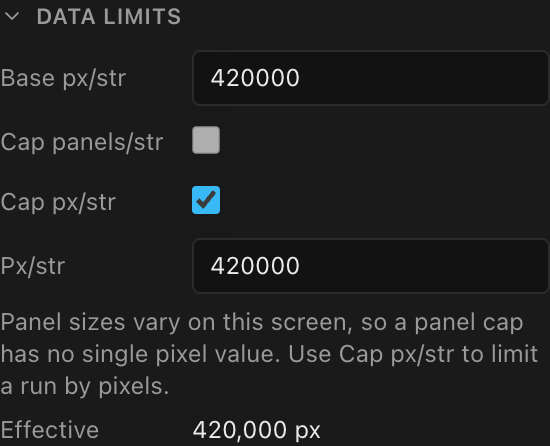
| Field | What it is | Default |
|---|---|---|
| Base px/str | How many pixels a data string may carry before a new string starts (integer ≥ 1). Read-only and live when a receiver card is installed. Without a card the typed number applies only while the screen's processor has no model; with a model, strings split at the processor's port capacity | 650,000 on a fresh screen |
| Cap panels/str | Optional hard cap on how many panels a data string may carry (Panels/str): "9 tiles per run", whatever the pixel count. Offered only when every panel on the screen is the same size | off |
| Cap px/str | Optional artificial pixel cap below the base limit (Px/str, opens at the base value); the engine splits at the lower of the two | off |
| Effective | Read-only: where a string actually breaks: the smallest of the base, the pixel cap, and what the panel cap works out to in pixels. Shown while a cap is active | n/a |
Finish a wall with a half-height row, override one panel's type, or use a masked corner shape, and the screen now carries two different panel sizes, so a count of panels no longer names one pixel figure, and Cap panels/str is greyed out with a note saying why. Cap those runs with Cap px/str instead. Blank (spacer) panels are ignored by the test, so a blank row never makes a uniform screen look mixed. See Screens that mix panel sizes.
The same strictest-wins rule applies here: a data run crossing onto another screen splits at the tighter of the two screens' effective limits, and the app names the screen doing the limiting.
Once the screen's processor has a model and there is no receiver card, strings split at that processor's per-port capacity at its Bit depth and Frame rate, and follow it live when you change either. The typed Base px/str is then not used, although Effective still reads from it. Check WIRING (COMPUTED) for the real string count, and use Cap px/str to split earlier. The full order is in Where the base limit comes from; the processor's capacity is covered in Choosing a processor & signal settings.
A V1 project may also carry V1's own data-limit Override, which used a second pair of caps. Data limits shows those caps directly, and converts the screen onto V2's fields the first time you change either one, without moving the effective limit. See Data path & string splitting.
Wiring (computed): the live roll-up
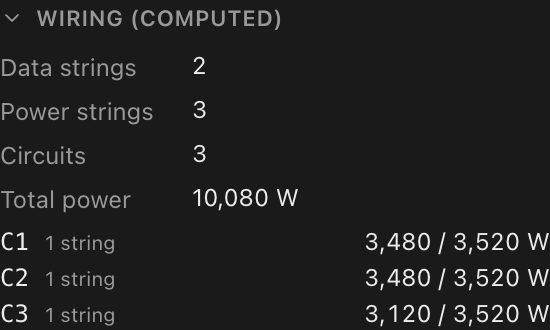
Read-only and always current for the selected screen:
- Data strings, Power strings, Circuits: the counts the engine derived. On a screen split across two processors, Data strings counts the cables on every processor, so it matches the number of
S-numbers the screen owns. - Total power: the screen's total draw in watts
- A per-circuit list: each circuit's label, how many strings it carries, and
used / limit W, with a red OVER flag when a circuit exceeds itsW = A·Vbudget
See Seeing & exporting your wiring for where these numbers land on paperwork.
Heat load
When a screen can report heat, a read-only HEAT LOAD section estimates the HVAC picture: Average load (W), Maximum load (W), Maximum heat (BTU/hr), and approximate Cooling (tons). Average load appears only when the panel type lists an average wattage (or an average heat figure); without one, the app doesn't guess, and the row is left out. When the panel type publishes no heat spec, the values are estimated from electrical power and a note says so (Estimated from electrical power (no published heat spec).).
These are the same numbers as the Heat load sheet block, so the inspector and the printed drawing always agree. The sheet block also prints this screen's Voltage as Supply voltage, and the Maximum current the screen draws at it, so the venue's electrician and HVAC contact can work from one page.