

Appearance
Corner panels
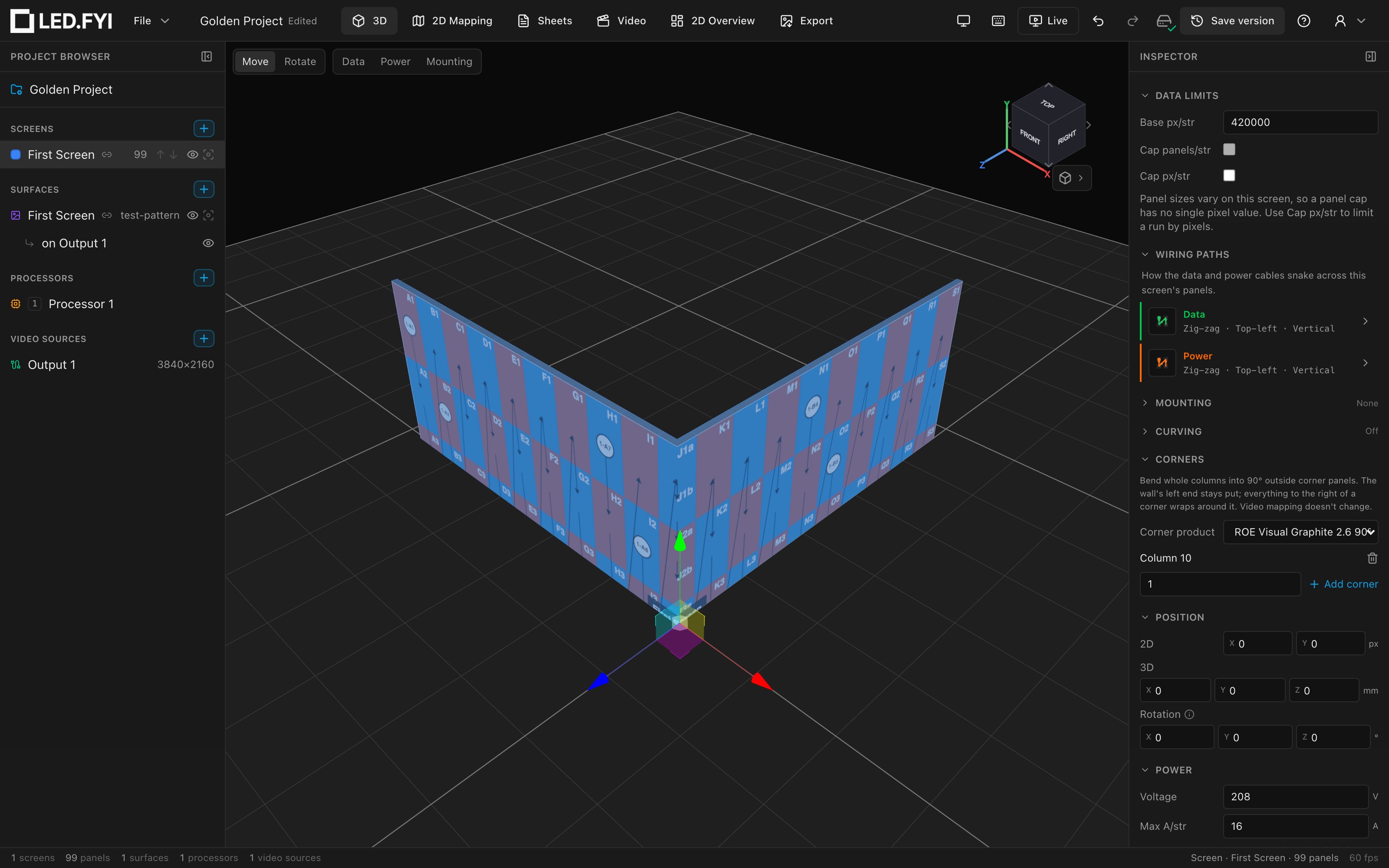
A corner panel is a panel bent 90° down its middle, so its two halves face outward around the outside of a corner, like the outside corner of a pillar or a building. A 500×500 mm panel becomes two 250×500 mm faces meeting at the fold. Any panel size works: the fold is always at the middle of the panel the screen uses.
Turning a column into corner panels folds the whole wall: every column to the right of the corner turns 90° and runs along the new face. Add more corners to keep wrapping. Four corners close a box around a pillar.
Not the same as a corner quarter panel
The Corner type on half panels is something else: it names the quarter-size cabinet where a half row meets a half column. This page is about panels bent 90°.
Making a column a corner
A whole column becomes corner panels, never a single panel, because half a column can't be bent. There are two ways to do it.
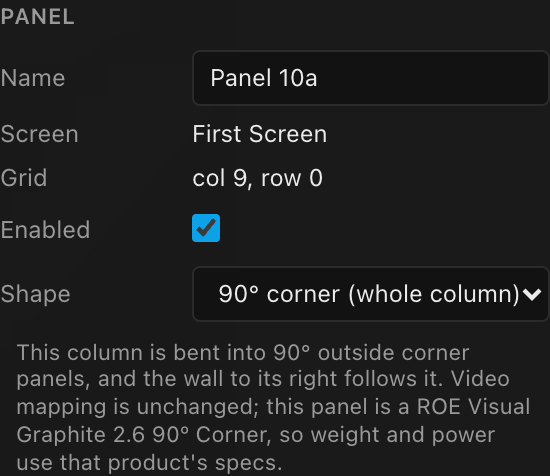
From a panel: select any full-size panel in the column and choose 90° corner (whole column) from Inspector → PANEL → Shape. The panel's whole column bends. To straighten it again, pick Flat (whole column) from the same menu.
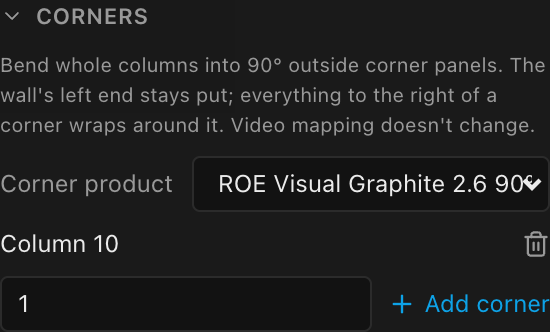
From the screen: select the screen and open Inspector → CORNERS. It lists every corner column. Type a column number (1 is the leftmost) and click + Add corner, or use the trash icon to straighten a column. The number box starts on the first column that isn't a corner yet, and while the section is folded its header sums it up: None, or the corner columns such as Col. 3, 7.
Real corner products
Many panel families sell a dedicated 90° corner cabinet. Enter it in the equipment library once (see Creating custom equipment): set Shape to 90° corner and Parent panel to the family's standard panel. The corner must be as wide as the standard panel, in millimetres and in pixels. Its height can match the standard panel or divide it evenly.
- It's picked for you. When you bend a column on a wall built from that family, LED.FYI names the family's corner product automatically. To change it, or to go back to the flat panel's numbers, use Inspector → CORNERS → Corner product. The list only offers corners that fit the wall's panel. Once a corner product is chosen, adding more corners keeps it. Pick Flat panel specs (estimate) to use the flat panel's numbers instead; that choice is kept too, so bending more columns won't bring the corner product back. When the library has no corner product for the wall's panel, or none that fits, the section says so instead of showing the picker.
- Shorter corners stack. Some families only make a corner half as tall as their standard panel, such as a 500×500 mm corner for a 500×1000 mm panel. Each cell of the corner column then holds two corners, stacked top to bottom, so a column 5 panels high becomes 10 corner panels. A half-height row holds one. The picker shows how many fit, for example
ROE Visual Graphite 2.6 Corner (2 per panel). - Every stacked corner is a real panel. It counts toward the screen's panel total, goes on the bill of materials under its own name, and draws the corner product's own power and weight. Data and power strings run through both corners of a cell before moving on: top first when the string runs down the column, bottom first when it runs up.
- Mapping still doesn't change. The stacked corners share their cell's pixels exactly: two 192×192 corners take the place of one 192×384 panel.
- Labels add a letter. The corners in a cell read a and b, top to bottom, after the row number:
C4 R1aandC4 R1bon cable labels and the data schedule. - On the wall too. The data-path and power-path test patterns draw each stacked corner as its own panel: its own label (
J1a,J1b), its own arrow and string marker, and a border between the two. Both keep their cell's checkerboard colour rather than alternating. - A corner product that doesn't fit the wall (a different width or pitch, or a height that doesn't divide the panel evenly) isn't offered, and a column without one keeps the flat panel's numbers.
- The panel says which numbers it uses. Select a panel in a corner column and the hint under Inspector → PANEL → Shape names the corner product when that panel is one, or says it's using the flat panel's specs (an estimate) when it isn't.
- Straightening the last corner column clears the corner product, or your Flat panel specs (estimate) choice, so the next corner you add picks the family's product again. Switching the wall to a different panel family, or to a custom panel, clears it too; picking the same family again keeps it.
What moves, and what doesn't
- The left end of the wall stays put. Adding a corner never moves the columns to its left; everything to its right swings around it.
- Video mapping doesn't change. A corner panel maps and composites exactly like the flat panel: same pixels, same place on the processor canvas. The picture simply continues around the fold in 3D.
- Curving still works. A curved wall can also have corners. The seams keep their curve angles and the corner adds its 90° fold. A screen with corners is anchored at its left end, curving included.
- Resizing keeps your corners. Adding columns keeps every corner. Removing a corner column's cells removes that corner.
- Choosing a corner clears any cut-corner shape (triangle or round), or a shaped product swapped onto a panel, in that column, because a bent panel can't also be a cut one.
- From behind, a corner panel is one bent cabinet: the frame, ribs and floor of each half meet in a mitre down the inside of the fold, with a single hub sitting across the inside corner. The lock levers and pins are on the outer edges, where the corner locks to its neighbours.
Rigging
- Hanging and ground-stack rigs put a folded bar on every corner column: one bar bent to the corner panel's shape, with a pickup clamp (hanging) or a leveling foot (ground stack) on each half.
- Bars never run across a corner. Each straight stretch of wall between corners is tiled with your Bar span on its own, so a cornered wall keeps its wide bars. (A corner is not a curve; only real curving forces 1-wide bars.)
- The folded bars are listed on their own BOM line:
90° corner hanging bar (500 mm)or90° corner stacking bar (500 mm). No mounting system in the library has a corner bar part yet, so these lines carry no SKU or weight. - Wall-mount rigs don't fold their profiles around a corner yet. Profiles still never span one, but the corner column gets an ordinary straight profile.
On paper
- The front, side, top and iso elevation drawings all show the bend. The top view is the clearest way to check the footprint.
- The bill of materials and the weight estimate list corner panels on their own line, so corners are ordered as corners. With a corner product the line is the product's own name and count (a stacked column counts every corner). Without one it's the flat panel marked as a corner, for example
ROE Visual Graphite 2.6 · 90° corner. - Without a corner product, a corner uses its flat panel's pixels, power and weight, and drawings that show those numbers carry an Estimated note saying so. With one, the numbers are the product's own and there is no note.
Limits today
Corners are 90° outside corners only, folded at the middle of the panel. Wall-mount profiles aren't folded around a corner, and the AR share shows each wall flat (as it does for curved walls).