

Appearance
Redundancy
For shows that cannot go dark, LED.FYI plans standby data paths at four levels. What's available is decided entirely by the selected equipment's library record: the pickers simply never appear on gear that can't do it, and the candidate lists adapt to each brand's pairing rules. Nothing is hardcoded.
| Tier | What it protects | Where you set it |
|---|---|---|
| Backup ports (loop redundancy) | One string: a second port feeds the string's last panel, so data flows in from the other end if the primary fails | Per string, in String assignment |
| Backup trunks | One processor→switch link: a second 10G cable into the same switch's backup uplink, on the trunk the processor pairs it with (ab: B backs A; ab-cd: C backs A, D backs B) | Per switch, in Switches & trunk cables |
| Backup switches | A whole switch: a dormant standby switch | Not yet available in V2 (the data model reserves it) |
| Processor mirrors | A whole processor: a second processor mirrors the primary | The processor's Redundancy section (below) |
Not to be confused with a bonded trunk
A bonded trunk is also a second cable from the processor into the same switch, but it is the opposite idea: both cables carry traffic, so the switch's bandwidth adds (2 × 10G = 20G) and nothing is held in reserve. A backup trunk buys resilience; a bonded trunk buys capacity. On a two-uplink switch you can have one or the other.
Backup ports per string
On a loop-capable processor, every assigned string row in Inspector → String assignment grows a second, amber-bordered dropdown: the backup port for that string's final panel. Pick a port to enable redundancy for that string; there is no separate toggle. (When Auto backup is set to Mirror 1:1 this dropdown is read-only, and a note under it reads "Auto backup is set to Mirror. Switch it Off to pick by hand.")
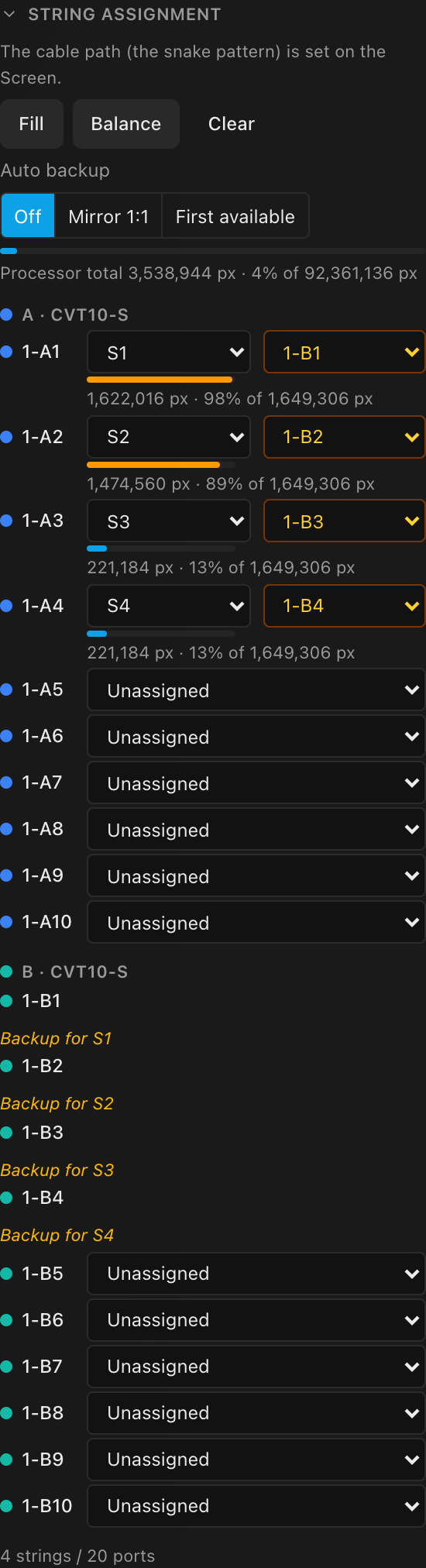
The candidate list adapts to the processor's pairing rules, straight from its library record:
| Pairing rule | Example gear | Backup candidates offered |
|---|---|---|
| Bidirectional | Megapixel HELIOS, Novastar, Brompton Tessera SQ200 | Any free panel-terminating port on any switch on the processor (or, on a processor with no switches, any free 1G output), plus the designated backup processor's ports (its switch ports, or its own 1G outputs: 1B-3). See Processor mirrors below. |
Paired trunk (ab-cd) | Brompton SX40 | The same port index on the paired trunk: A1 backs up to B1, C3 to D3 |
| Adjacent port | Brompton S8 | The paired port on the same device: 1↔2, 3↔4, … |
On a cascaded system (a switch feeding another switch, e.g. a Brompton SQ200 → QD-S → XD chain), only ports that plug straight into panels are offered as backups. A QD-S's own ports feed the next XD switch, not a panel; they never show up in the backup list, even when free.
A port reserved as another string's backup reads Backup for S4 in its row instead of offering a string dropdown, so you don't silently steal a standby feed.
To clear one backup, pick the - option; to clear them all, run Clear Redundancy Backups from the command palette. (Clearing a string's assignment also drops its backup.)
Auto backup: a switch that keeps every string backed up
Beside Fill / Balance / Clear in the String assignment header sits the Auto backup control. It is a setting on the processor, saved with the project, not a one-shot button, so it still reads the same after a reload, and it reacts as your strings change. What it offers depends entirely on the processor's own pairing rule: a Brompton SX40 or S8 and a Megapixel/NovaStar box show genuinely different controls, because their hardware makes genuinely different promises:
| Family | Auto backup offers |
|---|---|
Brompton (SX40 ab-cd, S8 adjacent) | Off · Mirror 1:1 (…): Mirror 1:1 is the only on-setting, unconditionally the hardware's own paired trunk or adjacent port on this same processor. No "First available", and no target to pick. See Brompton: Mirror 1:1 is the paired trunk/port, full stop. |
Megapixel / NovaStar, and the Brompton SQ200 (bidirectional) | Off · Mirror 1:1 · First available. Mirror 1:1 shows a second control, Mirror onto, to choose which switch or processor it mirrors against. See Megapixel/NovaStar: Mirror onto. |
| Setting | What it does |
|---|---|
| Off | No automation. Choosing Off removes every backup port on this processor (the same thing Clear Redundancy Backups in the command palette does), and hands the per-string picker back for hand-picking. Every project made before this control existed reads Off, with whatever backups it already had left exactly as they were. |
| Mirror 1:1 | Locked. Every assigned string is backed up on the same port number somewhere else, always, with no hand-picking: the per-string backup dropdown goes read-only while this is on. A failed switch or processor never takes out both feeds. |
| First available | Megapixel/NovaStar only. Every assigned string is backed up on the nearest free port: this processor's own spare ports (switch ports or 1G outputs) first, then its designated backup processor's. The per-string dropdown stays hand-editable. |
Brompton: Mirror 1:1 is the paired trunk/port, full stop
Brompton's own hardware already fixes exactly which port backs up which; there is nothing left to choose, so the control doesn't pretend otherwise. The button itself prints the actual pairing, so it's never a guess:
| Gear | Pairing rule | Button reads |
|---|---|---|
Tessera SX40 (ab-cd) | Same port number on the paired trunk's switch: A1 backs up to B1, C3 to D3 | Off · Mirror 1:1 (A↔B, C↔D) |
Tessera S8 (adjacent) | The adjacent port on the same device: 1↔2, 3↔4, 5↔6, 7↔8 | Off · Mirror 1:1 (1↔2, 3↔4, 5↔6, 7↔8) |
The pairs shown are the switches/ports actually on this canvas: a canvas with only an A and a B switch shows (A↔B), not a hypothetical (A↔B, C↔D) it doesn't have.
There is no "Mirror onto" picker for Brompton at all: nothing to choose, so nothing is shown. Mirror 1:1 never reaches across to another processor: even when a second SX40 is designated as this one's backup under Redundancy (below), that designation is a separate, whole-processor redundancy layer (the two SX40s share the same XD switches automatically), and it is never treated as a per-string mirror target.
If the paired trunk has no switch yet, the bulk pass does not create one, exactly like every other pairing rule: the string is left unbacked and the tooltip/toast names it precisely ("Trunk B has no switch. Add one.") Where a switch has no Backup trunk row at all (an SX40's own switches never get one, because trunk redundancy for that family is the second processor, not a second cable; see Backup trunks), a note under the switch explains why: "Trunk redundancy comes from the second processor on the same XD switches."
Megapixel/NovaStar: Mirror onto
Turning Mirror 1:1 on, on a flexible (bidirectional) family, shows a second control, Mirror onto, with up to two kinds of target, named by the actual device, never an abstract placeholder:
| Target | What it means | Who offers it |
|---|---|---|
| Switch B on this processor | No second processor needed: this processor's OWN switches pair up in twos by trunk ordinal: A backs up to B, C to D, and so on, same port number both ways. A canvas with more than one pair reads "Switches on this processor (A↔B, C↔D)" instead of naming just one. | Needs at least 2 switches on this processor. |
| Processor N Backup (designated) | The processor designated as this one's mirror under Redundancy → Backup proc. (below); the default whenever one exists. | Only when a backup processor is designated (and the family doesn't already get its mirror "for free" through shared switches). |
A mirror switch may also carry its own primary strings; it is never reserved wholesale just because it's a mirror target. Only the exact port number a primary needs is off-limits when the partner already uses it for one of its own strings; every other port on that same switch mirrors normally. So on a processor with switch A (all primaries) and switch B (already carrying its own primaries on B1–B3), A1–A3's rightful mirror ports are already taken (those three strings are reported blocked, by name), while A4 and up mirror cleanly onto B4 and up.
Mirror 1:1 stays hidden (only Off · First available show) when there is genuinely no target at all: no designated backup, and fewer than 2 switches on this one.
Choosing a target re-plans the whole processor, exactly like choosing the mode itself: the previous target's backups are replaced, all-or-nothing: if even one string could not be given its port on the new target, nothing changes, the control snaps back, and a message names the blocker. A target that would be blocked right now is still listed (so you can see what's available), and picking it toasts the reason instead of applying:
- No mirror target is available. Designate a backup processor under Redundancy, or add another processor with matching switches.
- Processor 7 Backup has no switch on trunk A. Add one. (the backup processor has no switch at the primary's trunk letter)
- Trunk B has no switch. Add one. (the paired switch on this processor is missing)
- Processor 7 Backup's switch on trunk A has no port A12. (the target switch exists, but is too small)
- Processor 7 Backup has no 1G output 12. (no switches: the backup processor has fewer 1G outputs than the string's port number)
- Port A7 on Processor 7 Backup is already reserved. (already a primary there, or another string's backup)
With Switch B on this processor as the target, the last two messages name this processor instead.
Choosing a setting re-plans the whole processor, and clicking the setting (or target) that is already selected re-applies it (useful to snap a Mirror 1:1 column back into shape after something changed it). Switching from Mirror 1:1 to First available (or back) replaces every backup on the processor with the new plan (including ones you picked by hand) in one undoable step. It is all-or-nothing: if even one string could not be given its port, nothing changes, the control stays where it was, and a message names the blocker so you can fix it and try again. An option that would be blocked right now is tinted amber, and its tooltip carries the same reason.
While Mirror 1:1 is on, it is LOCKED to your strings; turn it off to hand-pick. After Fill, Balance, a per-port assign or unassign, Clear, or Reset to automatic wiring on a screen this processor feeds, every backup on the processor is re-verified against its string's rightful mirror port, not just the strings missing one. A backup that isn't exactly the mirror port (a hand-pick from before Mirror 1:1 was turned on, one left behind when its string moved, or a leftover from a different target) is replaced, never kept; if a string's mirror port isn't available, the string simply gets no backup and the note under the header says why, per string. This is also what stops a stray leftover backup from ever blocking another string from claiming its own rightful mirror port. (Brompton follows the exact same locked rule (see above); it just never has a "target" to plan against.)
While First available is on (Megapixel/NovaStar only), backups follow your strings the way they always have. After Fill, Balance, or a per-port assign or unassign on that processor, any string that has no backup gets one in the current setting, and a backup whose port has become invalid (its switch removed, or the port now feeding a primary) is dropped and re-planned. A backup you picked by hand for one string is kept through these updates; only choosing a setting on the control re-plans it. If some string could not be given a port during such an update, a note under the header says why. You can turn either setting on before any strings are assigned: it simply arms, and the backups appear as soon as Fill assigns the strings.
A Megapixel/NovaStar-style processor that feeds strings straight from its own 1G outputs (no switches) offers Mirror 1:1 once it has a designated backup processor: each string is backed up on the same port number on the backup processor's own 1G outputs. A string on port 3 of processor 1 is backed up on port 3 of its backup, labelled 1B-3. That is the usual NovaStar hot-backup cabling. Without a designated backup processor it offers Off · First available only, because there is nothing to mirror onto. The Brompton S8 is different: its Mirror 1:1 pairs its own adjacent outputs.
The same setting is available from the command palette: Auto-Assign Backup Ports turns it on (Mirror 1:1 against its default target, or unconditionally for Brompton, when available; otherwise First available), and Clear Redundancy Backups turns it off.
A backup stays attached to the same physical run of panels as its primary port (the string is identified by its first panel, not by its position in the project-wide numbering), so adding a row to another screen, disabling a panel, resetting another screen's manual wiring or reordering screens never moves or drops it; only rewiring that run itself does (split it and both ports stay with the half that keeps the first panel; merge it into a run that already has ports and its own ports are dropped).
A backup feeds the far end of the whole run, so on a string that carries on onto another screen the dashed backup chip lands on the last panel of the final stretch, on that other screen, not at the seam where the run leaves the first one.
When a pick has side effects
Constrained pairing rules sometimes need the layout to change before a backup can exist. The picker tells you up front with a suffix on the candidate:
| Suffix | What happens when you pick it |
|---|---|
· +switch | The paired trunk has no switch yet: one is created automatically (same model as the primary's switch), silently, with a Backup switch added info toast naming the model, trunk, and port |
· move switch | A switch is blocking the paired trunk: a confirm dialog names the switch, its destination trunk, and how many string assignments travel with it; Move & assign proceeds |
· move string | A primary string occupies the paired port: a confirm dialog names the exact free port it will move to; Move & assign proceeds |
This side-effect handling is the per-string picker's own behaviour, the one thing it can do that Auto backup deliberately can't: the bulk pass never creates a switch or moves a string on your behalf, so a gap that would need one of these three side effects is simply left unbacked, with the reason named, until you either pick it by hand here or fix the layout yourself.
When the conflict cannot be resolved (no free trunk to relocate the blocker to, or no free port to move the string to), the pick is blocked with a No free trunks / No free ports alert explaining what to free up first.
If the engine stops listing your current backup as a valid candidate (for example after other edits), it stays visible in the picker as the current value rather than silently disappearing.
What a backup actually costs
A backup costs you a whole second port, not any of the primary port's pixels.
Assigning a backup marks that backup port as used, so it can't feed anything else. That's the real trade-off, and it's a limit on how many ports you have left, not on how many pixels each one can push. On a fully-loaded Brompton Tessera SX40 with 4× XDs, you have 40× 1G ports, but if you want loop redundancy on all of them, half go to backups, so you can really only drive about 20 outputs' worth of strings.
What a backup does not do is shrink the primary port's pixel ceiling. Adding redundancy never pushes a string that already fit into · over.
This used to be wrong
Until mid-2026 the app also halved the primary port's pixel ceiling on the Brompton Tessera S8 and SX40, and annotated the readout · halved for backup. That was double-counting: it charged for the backup twice, once by consuming the port (correct) and again by shrinking the primary's budget (wrong), so designs that genuinely fit could be falsely flagged over capacity. It came across faithfully from V1, so V1 had it wrong too. It is fixed: no processor we ship halves capacity, and the · halved for backup readout is gone.
Processor mirrors (tier 3)
On a processor whose library record supports processor redundancy, an Inspector → Redundancy section offers a Backup proc. dropdown: designate another processor as this one's full mirror. Candidates are processors not already mirroring a different primary; None clears the designation. With no eligible processor in the project the hint reads "Add another processor canvas to use as a mirror."

Once designated:
- The mirror's tag in the left rail and its Inspector header is its primary's number plus
B(e.g.9Bfor primary9's mirror), which is what now carries the "this is a backup" meaning (there's no separate amber pill any more; the tag says it). Hovering the tag still shows Backup (mirror) of <primary>. - The mirror's own Wiring area is replaced by a stripped Backup processor view. Its content depends on capability:
- Shared switches (Brompton XD/SX40): "Switches are shared with <primary> via the XD switches' secondary trunk inputs, so no separate config is needed here." Both processors cable into the same physical XD units. This is whole-processor failover, not per-string mirroring, and the primary's Redundancy section says so too (below), rather than implying its ports feed the per-string backup pickers.
- Direct outputs (1G mirror): the view points you back to the primary. You pick backup ports there, including this backup processor's own 1G outputs (see below).
- Own switches (Megapixel/Novastar-style): "Add backup switches here, then pick string backup ports on <primary>." The mirror gets its own switch list.
- The mirror's switch ports then appear as tier-3 backup candidates in the primary's string rows, tagged with the mirror's own tag (e.g.
9B-A1for primary9's mirror) for every family except one whose mirror shares the same switches (Brompton SX40): there, the hint under the Backup proc. picker reads "This is processor redundancy, not per-string mirroring. The backup shares this processor's own switches automatically, so its ports are never offered as string backups." A backup you pick on a Megapixel/NovaStar-style backup processor is stored with the project like any other backup and is kept across reloads, cloud saves, save-as-copy and version restores. If you later remove that switch from the backup processor (or delete the backup processor itself), the primary's backups that pointed at it are cleared (those strings keep their main ports, just unbacked), so the project keeps saving normally.
Backing up 1G strings onto the backup processor's own outputs
When both processors feed panels straight from their 1G outputs (for example two Novastar UHD Jr in hot backup), each string's backup dropdown on the primary lists the backup processor's free 1G ports too, tagged with the backup's own tag: 1B-1, 1B-2, and so on. They appear after the primary's own spare ports. Pick one by hand, or turn on Mirror 1:1 so every string gets the same port number on the backup processor. Main port N backs up to backup port N.
These backups work like any other:
- The backup cable appears in the cable-label CSV with the backup processor as its From end and processor.
- The System Diagram draws a dashed line from the backup processor into the string's last panel.
- The backup counts on the bill of materials.
If you remove the backup processor, clear its Backup proc. designation, or change it to a model without that port, those backups are cleared. The strings keep their main ports, just unbacked. A V1 project that used the backup processor's 1G outputs imports these backups instead of dropping them.
Where redundancy shows up
- Overlays, test patterns & sheets: a backed-up string's last panel carries the dashed labeled circle with the backup port label; primaries stay solid. On sheets, a backed-up string loops back instead of ending in an X. Backup markers and backup gear are inked in your backup colour (grey by default) and primaries in your main one; both are yours to choose under Preferences → Main and backup, and both stay dashed-vs-solid so a monochrome print still reads correctly. See the design language.
- String assignment: a port reserved as a backup reads Backup for SN in its row.
- Cable-label CSV: dedicated Backup data cables (backup port → last panel) and Backup trunk cables (backup processor / spare output → switch) types. See labels.
- Bill of materials: backup switches and trunk cables are counted. See Bill of materials.
- Weight estimate: backup data cables are real cable hanging on the screen, so each one adds a home run to the data-cable weight. Backup trunk cables are excluded along with primary trunks. See Cable weight.