

Appearance
Units of measurement
Preferences → Units records which measurement system you prefer, and every drawing and parts list follows it live unless that drawing set has been given units of its own. It's also the second question in the first-run tour, and it follows your account across devices when you're signed in.
| Option | Meaning | Default |
|---|---|---|
| Metric | millimetres · metres · kg | ✓ |
| Imperial | inches · feet · lb |
What the preference changes
Two things, and the boundary between them is deliberate: what you design in stays metric; what you hand someone follows your preference.
It sets the units your drawings and parts list print in
Everything in the packet follows it, straight away: dimension callouts on the elevations, the panel datasheet, the weight estimate and the bill of materials, on paper and in the Inspector's read-out alike. Switch Metric → Imperial with the Sheets workbench open and the drawing re-letters as you close the dialog. Nothing is rewritten in the project: the same file just reads in your units, and in your colleague's units for them.
Unless the drawing set has units of its own
A drawing set follows the preference only until somebody picks units for it. Touch Distances, Weights or Both systems in the Drawings inspector and that set is pinned: it prints what was chosen no matter whose preference is looking at it, which is what keeps an issued packet honest. The Units row in that same panel says which state the set is in (Following preference or Set here), and Use preference hands it back.
It sets the units of the Data path pattern's physical read-out
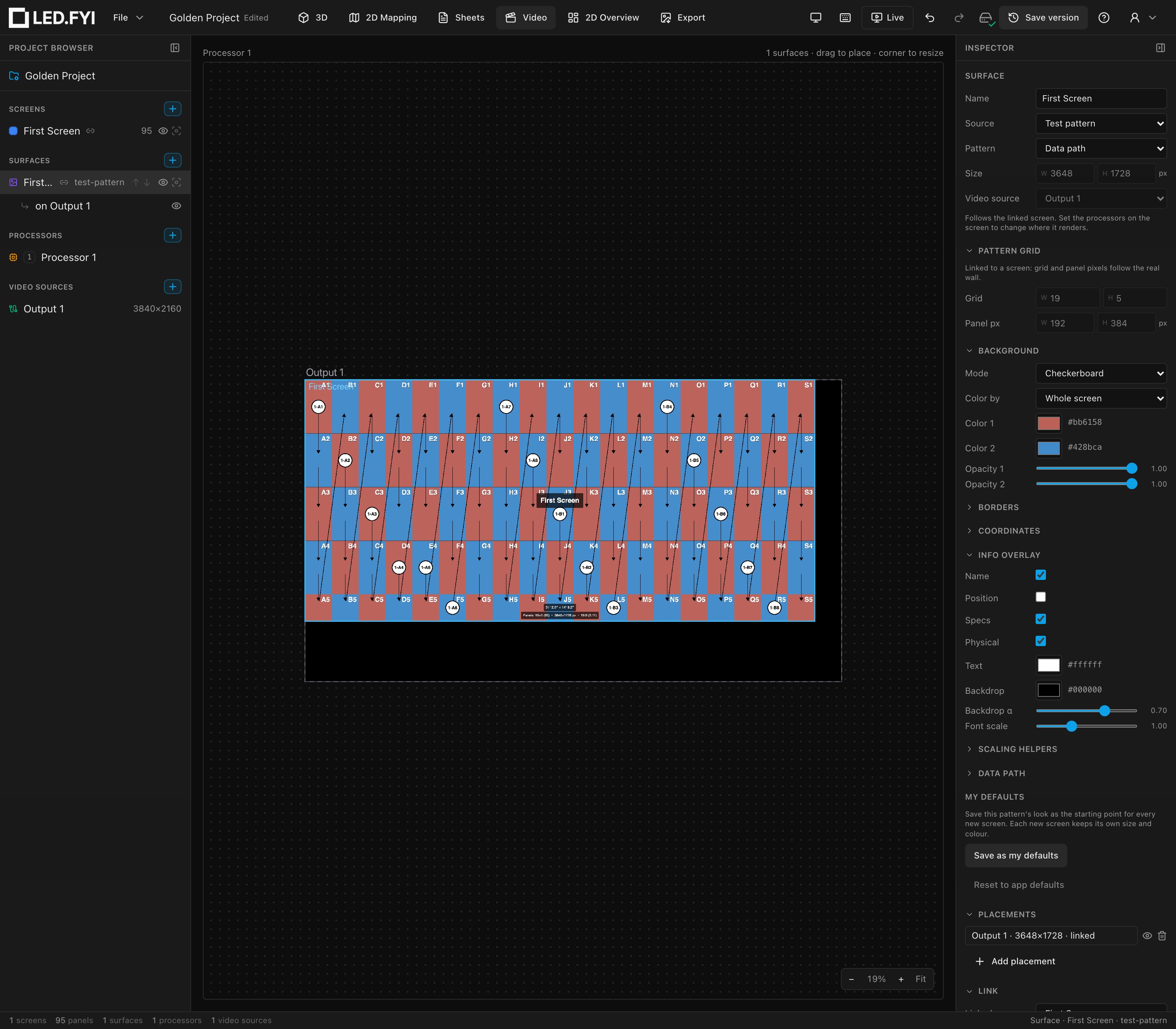
When a surface runs the Data path pattern, its Inspector → Info overlay section has a Physical toggle that prints the wall's real size on the pattern. That line follows your preference, like the paperwork does: Metric reads like 3.50 m × 2.25 m, and Imperial like 11′ 5.8″ × 7′ 4.6″, to a tenth of an inch: a quick on-wall check, not a drawing callout. There is no separate units setting on the surface.
Only on a surface linked to a screen
The size comes from the screen the surface is linked to. A surface that isn't linked draws a made-up grid with no real size, so turning Physical on there prints nothing.
The Inspector stays in millimetres, on purpose
Every dimension field in the app is mm and kg, in both unit systems. Screen sizes, panel and cabinet dimensions, mounting-hole patterns, cable stock lengths, weights, and X/Y/Z positions above all, which are always millimetres and have no imperial mode at all.
That is a decision, not a gap. A project is a shared file. If a position meant inches to you and millimetres to the person you sent it to, the two of you would read the same drawing differently. So the numbers you design with are one language, and the numbers you hand over are the ones that speak to whoever is receiving them.
If you need a figure in imperial while you work, put the value on a sheet: the drawing set converts it, using the right convention for what the number is (below). Flipping the preference converts the whole packet at once.
Imperial is three conventions, not one
Where the app does print imperial (on drawings and the parts list), a US crew reads three different kinds of number three different ways, so the paperwork does too. Which one applies depends on what the number is for, not how big it is.
| What the number is | How Imperial prints it | Example |
|---|---|---|
| Something you lay out: a dimension callout on an elevation | Architectural feet and inches | 31' 2-1/4" |
| Something you cut or drill: a mounting bar, a fixing pattern | Fractional inches, never rolled to feet | 19-11/16" |
| Something you order: a cable run, a stock length | Decimal feet, exact | 98.43 ft |
All three round to the nearest 1/16" (the finest mark on a standard tape), so a callout, a datasheet row and a parts row on the same sheet always agree about the graduation. Decimal inches (374.02") are a machining convention and appear nowhere in the paperwork.
A drawing set can also print both systems side by side, 3500 (11' 5-13/16"), when one packet has to serve both audiences.
Units vs. language
Units and language are independent choices: switching the UI to Deutsch or 简体中文 never changes your unit system, and picking Imperial never changes the language. Number formatting (decimal separators) follows the language; the units follow this preference.