
Appearance
Half panels & blank panels
Two screen-level options change what the edge rows of a wall physically are: half panels make one edge row or column half a panel deep (real half-size product, half the pixels), and a blank panel row adds a row of structural spacers with no electronics, typically to raise a ground stack and give it a presentable bottom edge.
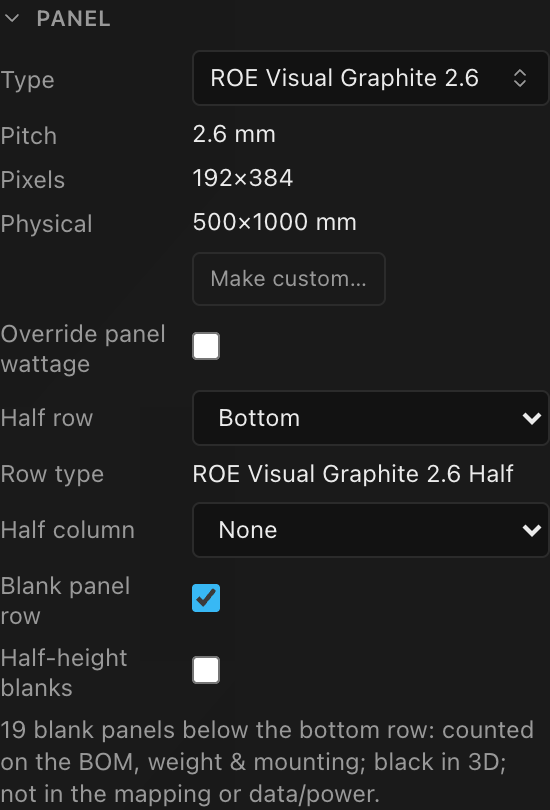
Both live in Inspector → PANEL on the selected screen:
Half-panel edge rows & columns
| Control | Options | Default |
|---|---|---|
| Half row | None · Top · Bottom · Top & bottom | None |
| Half column | None · Left · Right | None |
Setting a half row makes that edge row physically half a panel tall: pixels, physical size, wattage, weight, and what it counts as on the parts list all follow. A half column does the same on the left or right edge, at half width. One row and one column can be active at the same time; the panel where they meet becomes a quarter panel.
Top & bottom puts a half row on both horizontal edges with full panels in between. This is the common layout when a wall of 500 × 1000 cabinets is finished top and bottom with the square 500 × 500 version of the same product. Both half rows use the same Row type; they are the same physical panel. A one-row-high screen set to Top & bottom is simply halved once; top and bottom are the same row.
Shaped corners in the half rows
Because a half row is made of square cabinets, the corner panels are the natural place to fit a triangle or rounded piece. Select one and give it a shape variant. That plus half rows on both edges covers most non-rectangular walls without any freehand panel placement.
The screen's Resolution read-out and any linked surface placement shrink by half a panel per half edge automatically, so Top & bottom takes a whole panel of height off the wall.
Which half product is used
When a half is active, a read-only Row type / Col type row shows which panel type the half row uses (one type covers both rows on Top & bottom):
- A real half product from the same library family, when one exists, matched by its half shape, or by its pixels: half on that axis and full on the other. You get the product's real spec.
- An automatically derived half type otherwise, shown as
<model> (half row) · auto: half the pixels, half the physical size, half the wattage, and half the weight of what a full panel on this screen resolves to.
The two axes want different pieces. A half row takes the half-height product: the square 500 × 500 cabinet on a 500 × 1000 wall. A half column takes a half-width product, which most families don't make. So on a family that only makes the square piece, the half column gets the derived type. It won't borrow the square cabinet, which is the wrong size for a column. Likewise, a quarter-size cabinet (a 500 × 500 piece of a 1000 × 1000 wall) is only ever used for the corner, never for a half row or column.
Spot the · auto suffix
An auto-derived half is an estimate, not a catalog product. On an untyped screen its wattage is half of the screen's effective per-panel wattage and its weight is a guess. Check the Row type / Col type read-out before the numbers go on paperwork.
The half controls are always available: a library family without a half variant simply gets the auto-derived type instead of hiding the option. The one exception is a screen cut into slices: its Half row and Half column are disabled until you ungroup the slices, because a half edge moves the panel seams the slices are pinned to.
On the parts list and the weight sheet
A half panel is a different cabinet from the full one, and everything that counts cabinets treats it that way. On the bill of materials the half row is its own line at its own quantity. A 19 × 5 wall with a half bottom row orders 76 × Graphite 2.6 and 19 × Graphite 2.6 Half, not 95 of the full model. The weight estimate does the same, using each product's real per-panel weight, so the screen total is the weight of what you're actually hanging.
The Inspector's BOM (computed) read-out, the downloadable spreadsheet and the printed sheet block are one computation shown three ways, so they always agree.
Screens brought over from V1
Halves used to be counted as full cabinets on both the parts list and the weight. On that same 19 × 5 wall the estimate read 817 kg of panels where the wall actually weighs 750 kg, about 67 kg of phantom weight, on the figure riggers size a hang from. Opening an existing project now shows the corrected numbers. Nothing about the wall changed; the old figure was wrong. Re-check any rigging plot or quote that was built from the old total.
Corner (quarter) panels
Set a half row and a half column and the cells where they meet become quarter panels: a quarter of a full cabinet, at the corners. A third read-out appears for them:
| Control | Options | Default |
|---|---|---|
| Corner type | Any quarter-size product in your library, or nothing (unset) | unset (Estimated from full panel) |
If the manufacturer sells the corner cabinet as its own product, pick it here. The corner then goes on the parts list by name, at the manufacturer's own weight and wattage. Someone ordering from that list has a real SKU to give the supplier. If your panel family carries a quarter sibling in the library, it is filled in for you the moment the quarter cells appear; otherwise pick it yourself.
Leave it unset and the corners keep the estimate described below: a quarter of the full cabinet, clearly flagged. That is the honest answer when the corners are field-cut or the product simply isn't in the library, so unset is a perfectly good state, not an error.
The Corner type only appears while both a half row and a half column are active; removing either one dissolves the quarter cells and clears the choice with them.
The library has no usable corner product yet
Today the catalogue contains exactly one panel tagged as a quarter, RX-Vision RE193d, and it is almost certainly mis-tagged: it is 496 × 496 mm and 9.2 kg, an ordinary full-cabinet profile, it is the only RX-Vision product in the library, and a genuine quarter of it would imply a 992 × 992 mm parent that does not exist anywhere in the catalogue. Picking it for a corner would put a full cabinet's 9.2 kg on a cell the estimate values at about 2.1 kg. Until real quarter products are added, the estimate is the better number. Leave Corner type unset.
When there's no half product at all
A screen can end up with a half row and no half product to name it: a project imported from V1 that never stored one, or a corner (quarter) panel with no Corner type set. In that case the half cabinet is counted as its fraction of the full one: half the weight and half the watts for a half panel, a quarter for a quarter panel, taken from the full cabinet's published spec.
That is an estimate, and the paperwork says so. Sheets that print these numbers carry a line naming exactly what was estimated: "Estimated: N half-size panels have no half-size product in the library. Data, power & weight are scaled down from the full panel." for the halves, and "Estimated: N corner panels have no quarter-size product in the library. …" for the corners. A wall with a half row and a half column gets both lines, so the two are never confused.
The parts list keeps these on a separate, shape-suffixed line so they can't be ordered as full cabinets by mistake; a corner reads <model> · Quarter. To make the numbers exact, give the screen a half Row type / Col type or a Corner type (see above). For the halves the app picks or derives one automatically whenever you set a half row here.
Blank (spacer) panel rows
Blank panel row adds one row of blank panels (real structure with no electronics) below the screen's bottom edge. Use it to raise a ground-stacked wall off the deck and finish the bottom edge; see Ground stacking.
| Control | What it does | Default |
|---|---|---|
| Blank panel row | One structural blank row below the grid | off |
| Half-height blanks | Makes the blank row half a panel tall (raise by half a panel) | off (full height) |
A helper line under the toggle states exactly what you're getting, e.g. 19 blank panels below the bottom row: counted on the BOM, weight & mounting; black in 3D; not in the mapping or data/power.
Blank panels:
- are counted on the bill of materials, the weight sheets, and in mounting hardware
- render black in the 3D view
- are excluded from the 2D mapping view and from all data, power, and cabling
- don't count toward your plan's panels-per-screen limit; that limit counts LED panels only, so adding a spacer row can never push a screen over it
- show a read-only
Blank panelshape in the panel inspector and can never carry a shaped variant
Only a single bottom row is supported; there is no blank top row or column.
Blank vs. disabled: which do you want?
| I want to model… | Use |
|---|---|
| A riser/spacer row under a ground stack: real steel, real weight, no pixels | Blank panel row (counted on BOM/weight; black in 3D) |
| A hole in the wall (a cutout, an L-shape, a pillar gap), nothing physically there | Disable the panels (excluded everywhere; grey in 3D); see Panel layout |